Store

‘Local AI’ is a collection of AI tools that run entirely on your computer.
There is no cloud account, no subscription, no usage fees, and no per-prompt limits.
Your prompts and results stay on your machine.
It consists of the following assets:
- 🎵 Music, compose songs offline from a style preset and optional lyrics.
- 🗣️ Voice, generate speech offline from a Voice Preset, with optional emotion tags.
- 🛡️ Moderator, moderates chats in more than 23 languages.
- 🌐 Translator, translate game text offline from a CSV or a pasted block.
- and more to come…
Requirements
All ‘Local AI’ assets are developed for Unity 6 (version 6000.0 or higher).
Music, Voice, and Translator run in the Windows x86_64 Editor. They are not added to a player build unless you import the generated files yourself.
Moderator is a runtime component: it runs in play mode and in player builds (including WebGL).
A GPU is recommended. It is much faster than CPU.
If you don’t know how to install Unity 6, follow this official tutorial.
Installation
- Import the assets into your Unity project. If you’ve purchased the bundle, you’ll be able to download all the assets from the store at no charge.
- Open editor tools from Window → Fronkon Games → Local AI, or add a runtime component such as Moderator.
- Download extra model files when the asset asks for them (Music, Voice, Translator). Moderator includes its Sentis model in the package.
*.gguf and *.gguf.part to your .gitignore file.
🎵 Music
‘Local AI: Music’ generates songs offline inside the Unity Editor. Describe style and arrangement, optionally write sectioned lyrics, then render a WAV on your machine.
- Private and local. Prompts, lyrics, and the WAV never leave your computer.
- Editor-only. Tools live under Window → Fronkon Games → Local AI → Music. Nothing is added to a player build unless you import the generated audio yourself.
- Hundreds of styles. Genre presets ship in the package, including instrumental variants. Duplicate and edit them, or create your own.
- Optional lyrics. Assign a lyric asset for a sung track. Leave lyrics empty (or use a style that describes no singer) and generation is treated as instrumental without rewriting the style asset.
- WAV output. Stereo, 44.1 kHz, 16-bit PCM. Length 5–300 s.
- Game-ready loops. Enable Seamless loop to search for a natural wrap in the WAV and mark the imported AudioClip as loopable.
- CUDA, then Vulkan, then CPU. A GPU is not required. CUDA is used when a compatible NVIDIA GPU is present.
Requisites
To ensure optimal performance and compatibility, your project must meet the following requirements:
- Unity: 6000.0 or higher.
- Editor: Windows x86_64.
- GPU: not required. CUDA is used when a compatible NVIDIA GPU is present, then Vulkan, then CPU.
- VRAM: about 12 GB for the included quantized models. A 16 GB card is more comfortable.
- Free space: at least 10 GB of free space.
Installation Guide
- Import Local AI: Music.
- Create a music style using the Window → Fronkon Games → Local AI → Music → Style tool (or use or modify one of the hundreds of included presets).
- Create the lyrics using the Window → Fronkon Games → Local AI → Music → Lyrics tool.
- Open Window → Fronkon Games → Local AI → Music → Generator. Select the style and lyrics.
- Set the Models folder and click Download, or select a folder that already contains the five GGUF files.
- Click
Generate.
Tools
Style
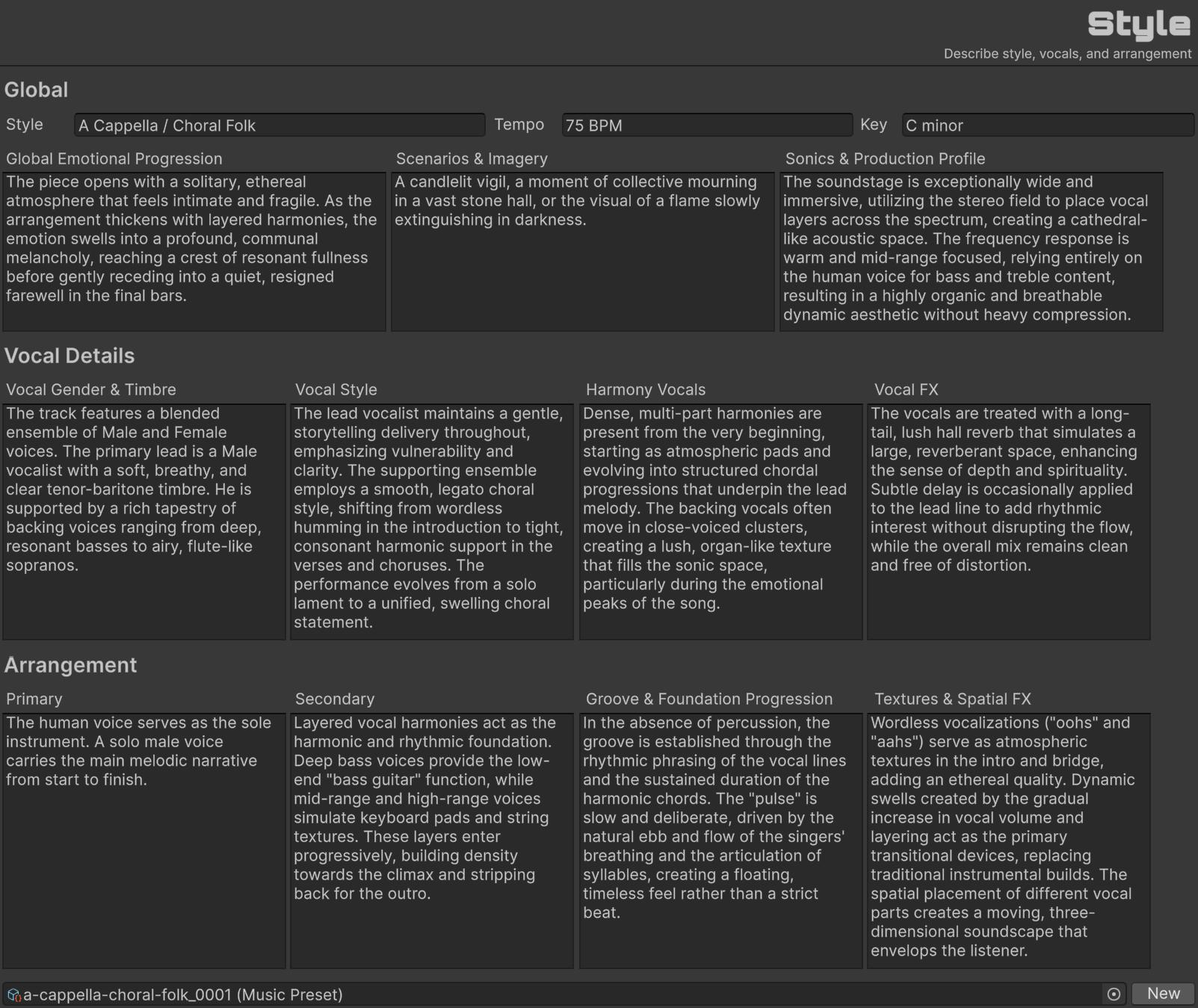
A Style is a MusicPreset asset: a structured description of genre, mood, vocals, and arrangement. The generator turns this text into the caption sent to the model.
Create one with New, pick an existing asset in the object field, or start from a preset under Editor/Presets/. Changes are saved on the asset when you edit it.
Global
| Style | Genre and subgenre, for example synthwave or acoustic folk. |
| Tempo | Speed of the track, for example 96 BPM. |
| Key | Key and scale, for example C major. |
| Global Emotional Progression | How the mood should evolve from the start of the song to the end. |
| Scenarios & Imagery | Listening context, pictures, and intended use (menu, trailer, in-game bed, and so on). |
| Sonics & Production Profile | Mix, soundstage, frequency balance, and dynamics. |
Vocal Details
These fields describe a singer. If you generate without lyrics (or with empty section text), the generator builds an instrumental request and does not write these fields back onto the asset.
| Vocal Gender & Timbre | Who sings and how they sound (gender, range, timbre). |
| Vocal Style | Delivery, phrasing, and how the performance evolves. |
| Harmony Vocals | Backing vocals, choir, and stacks. |
| Vocal FX | Reverb, delay, widening, and other vocal processing. |
Arrangement
| Primary | Main instruments present for most of the song. |
| Secondary | Supporting instruments and when they enter or drop out. |
| Groove & Foundation Progression | Rhythm, bass, drums, and how the groove changes over time. |
| Textures & Spatial FX | Atmosphere, spatial FX, and section transitions. |
Lyrics
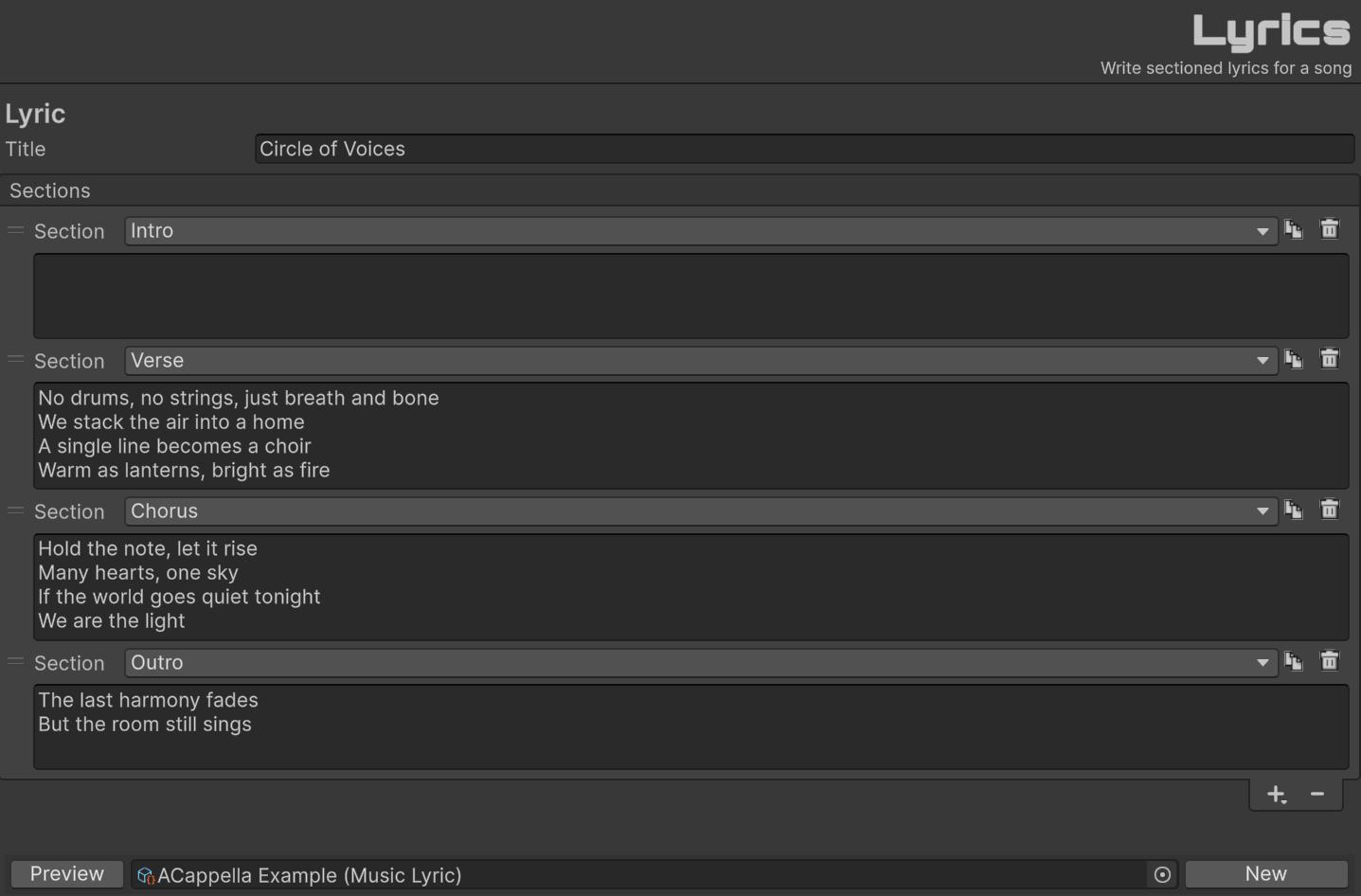
A Lyrics asset is a MusicLyric: a title plus reorderable sections. Lyrics are optional. If you skip this asset, or every section has empty text, the generator treats the song as instrumental.
| Title | Name of the lyric sheet (also used as the default file name when you click New). |
| Sections | Ordered list of parts. Drag to reorder. Use + to add a template, duplicate, or delete. |
| Section | Kind of part: Intro, Verse, Pre-Chorus, Chorus, Post-Chorus, Bridge, Instrumental, Solo, Outro, or Custom (your own heading). |
| Text | Sung lines for that section. Leave empty to emit [instrumental] for that part. |
| Preview | Opens a window with the tagged lyric sheet sent to the model ([Verse], [Chorus], and so on). |
Multiple voices (experimental)
To assign different singers to different sections (for example, a duet) describe both voices in Style → Vocal Details (gender, timbre, and who sings which part).
Add short voice tags on their own lines inside the section text: [male vocal], [female vocal], or [duet].
Caption-only instructions are usually not enough, tags in the lyrics matter too. Keep each tag to one or two words, longer tags may be sung aloud.
[Verse]
[male vocal]
I walked alone through midnight rain
Every street remembers your name

[Verse]
[female vocal]
You left a letter by the door
Said you weren't coming back no more

[Chorus]
[duet]
We were fire, we were flame
Nothing left but ash and shame
In the Style, name both singers and state who opens, for example, a deep male baritone on the first verse, a bright female soprano on the second, both joining the chorus, with no choir or doubled backing vocals.
Section-level switching works best; line-by-line alternation usually fails. Casting is not deterministic, try different seeds and check the first few seconds; if the wrong voice opens, generate again.
Generator
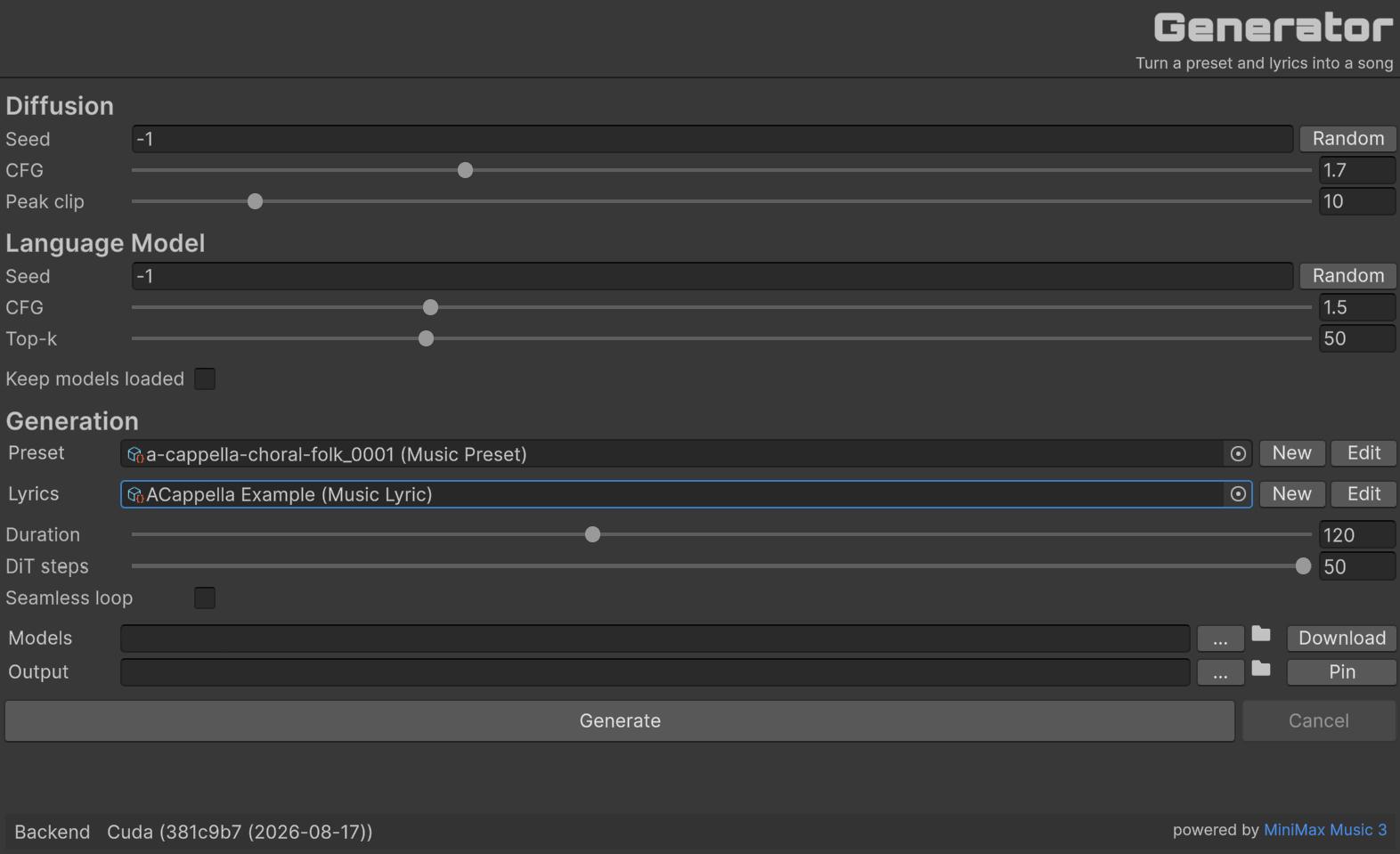
Assign a style, optionally lyrics, then Generate. Native backends are tried in order: CUDA → Vulkan → CPU.
Diffusion
| Seed | DiT noise seed. -1 picks a random seed. |
| CFG [1.0-3.5] | Diffusion guidance. Higher follows the style more strictly. Default: 1.7. |
| Peak clip [0-100] | Limits output peaks to reduce distortion. Default: 10. |
Language Model
| Seed | Language-model sampling seed. -1 picks a random seed. |
| CFG [1.0-3.0] | Language-model guidance. Default: 1.5. |
| Top-k [1-200] | Sampling is limited to the k most likely tokens. Default: 50. |
Generation
| Keep models loaded | If enabled, GGUF weights stay in memory between runs (faster repeats, more RAM/VRAM). |
| Preset | The MusicPreset (style) to generate from. New creates an asset; Edit opens Style. |
| Lyrics | Optional MusicLyric. New creates an asset; Edit opens Lyrics. |
| Duration [5-300 s] | Length of the WAV. Default: 60. Output is always stereo 44.1 kHz 16-bit PCM. |
| DiT steps [8-50] | Diffusion transformer steps. Higher is slower and can be cleaner. Default: 30. |
| Seamless loop | After generate, search for a loopable wrap and mark the imported AudioClip as loopable. |
| Models | Folder that contains the five GGUF files. Download fetches them. |
| Output | Destination .wav path (stereo, 44.1 kHz, 16-bit PCM). Pin highlights the clip in the Project window if it is inside the project. |
| Generate | Starts generation. Disabled until a style is assigned and the model files are valid. |
Powered by MiniMax Music 3.
🗣️ Voice
‘Local AI: Voice’ generates speech offline inside the Unity Editor. Invent a speaker (or clone a clip), bake it onto a Voice Preset, then speak lines in Voice Generator. Optional emotion tags change delivery without changing the speaker.
- Private and local. Prompts, clips, and the WAV never leave your computer.
- Editor-only. Tools live under Window → Fronkon Games → Local AI → Voice. Nothing is added to a player build unless you import the generated audio yourself.
- Voice Preset. Instruction invents a speaker from gender and a description. Clone copies a reference clip and its transcript. Generate bakes a dry 24 kHz take onto the asset.
- Voice Generator. Always clones that baked speaker. Tag emotion per block.
- WAV output. Mono, 24 kHz, 16-bit PCM.
- Only English supported. Support for Chinese is experimental.
- Post-FX. Optional mix, space, polish, and stylized effects live on the preset. Play in Voice Preset and Generate in Voice Generator apply them. The bake stays dry so the clone reference is unchanged.
- CUDA, then Vulkan, then CPU. A GPU is not required. CUDA is used when a compatible NVIDIA GPU is present.
Requisites
To ensure optimal performance and compatibility, your project must meet the following requirements:
- Unity: 6000.0 or higher.
- Editor: Windows x86_64.
- GPU: not required. CUDA is used when a compatible NVIDIA GPU is present, then Vulkan, then CPU. A GPU is strongly recommended (NVIDIA or AMD).
- VRAM: about 8 GB. A 12 GB card is the minimum recommended configuration. 16 GB is more comfortable for longer takes.
- RAM: 32 GB system RAM is recommended. Generation can pin the CPU at 100% while a take is running.
- Disk: about 8 GB for model files. At least 10 GB of free space.
Short lines generate in a reasonable time. Dialogue and storytelling (long paragraphs) take much longer. Prefer several short generations over one long script.
Installation Guide
- Import Local AI: Voice.
- Open Window → Fronkon Games → Local AI → Voice → Voice Preset.
- Set the Models folder and click Download, or select a folder that already contains
Voice.gguf. - Create or pick a Voice Preset. Fill Instruction (gender + description) or Clone (clip + transcript).
- Click Bake voice preset.
- Open Window → Fronkon Games → Local AI → Voice → Voice Generator. Assign the preset, write the line, click Generate voice.
Tools
Voice Preset
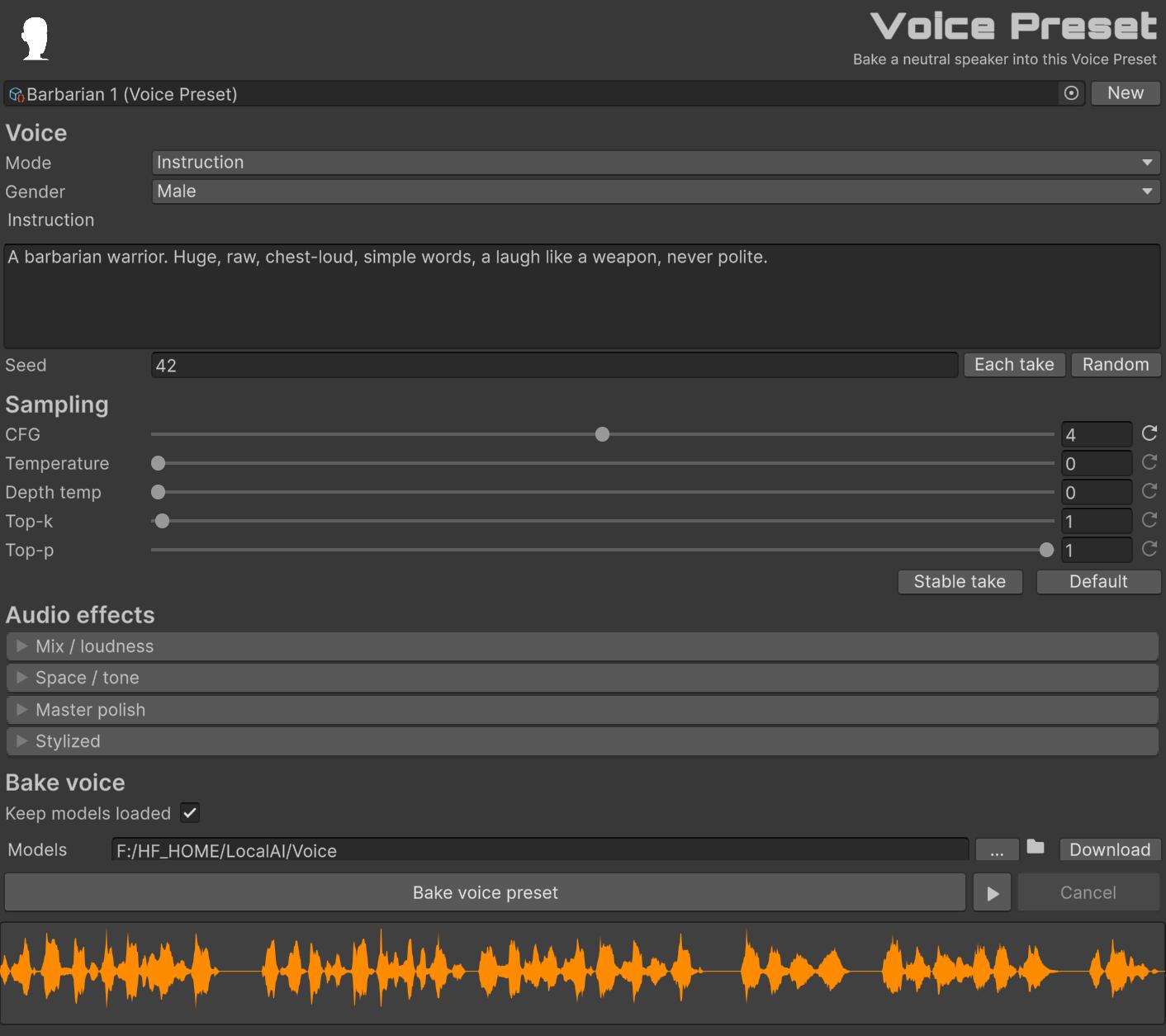
A Voice Preset is a VoicePreset asset: the speaker definition plus baked 24 kHz samples. Create one with New, or pick an existing asset in the object field (+150). Changes are saved on the asset when you edit it.
Generate speaks a fixed test line and stores the dry samples on the preset. Play previews those samples with the preset’s post-FX. The stored bake stays dry for cloning.
Voice
| Mode | Instruction invents a speaker. Clone copies a reference clip. Switching mode sets CFG to 4 (Instruction) or 1 (Clone). |
| Gender | Instruction only. Male, Female, or Neutral. |
| Instruction | Natural-language voice description. Do not wrap it in parentheses. Match the instruction language to the spoken text. |
| Audio clip | Clone only. Reference speaker. Required with a transcript. |
| Transcript | Clone only. Exact words spoken in the clip. Required. |
| Seed | Sampling seed. Official examples use 42. -1 picks a random seed each bake (Each take). Random picks a seed now and keeps it. |
Sampling
How the bake samples the speaker. Stable take (temperature 0, depth temp 0, top-k 1) repeats more closely with a fixed seed. Default uses CFG for this mode, temperature 0.9, depth temp 0.9, top-k 50, top-p 1, and invents more variation.
| CFG [0-8] | Classifier-free guidance. Instruction uses 4. Clone uses 1. |
| Temperature [0-1.5] | Backbone sampling. Official default is 0.9. 0 is greedy. |
| Depth temp [0-1.5] | Depth-decoder sampling. Official default is 0.9. Set to 0 with Temperature 0 for a stable take. |
| Top-k [0-200] | Keep the k most likely tokens. Official default is 50. 0 disables top-k. Use 1 with temperature 0 for greedy. |
| Top-p [0.05-1] | Nucleus sampling. Official default is 1 (off). |
| Stable take | Temperature 0, depth temp 0, top-k 1. |
| Default | CFG for this preset mode, temperature 0.9, depth temp 0.9, top-k 50, top-p 1. |
Bake voice
| Keep models loaded | If enabled, model files stay in memory between runs (faster repeats, more RAM/VRAM). |
| Models | Folder that contains Voice.gguf. Download fetches it. |
| Bake voice preset | Speaks a fixed test line and stores mono 24 kHz samples on this preset. Does not apply post-FX. |
| Play | Previews the baked neutral voice with this preset’s post-FX. |
Audio effects
Optional post-FX stored on the Voice Preset. Voice Generator applies them after creation. Play in Voice Preset applies them to the preview. The bake stays dry.
Mix / loudness
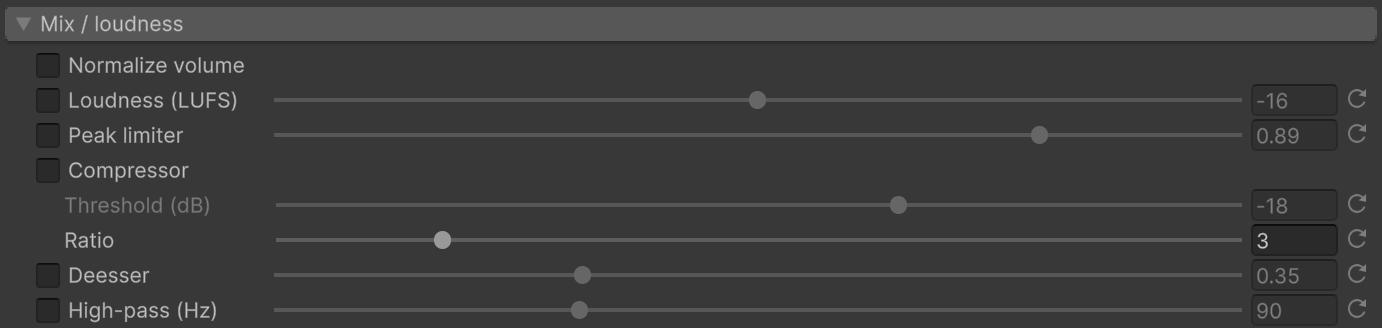
| Normalize volume | Peak-normalize spoken lines so emotion blocks share a similar level, then the finished take. Default: on. |
| Loudness (LUFS) | Match integrated loudness after FX. Typical speech is around -16 LUFS. |
| Peak limiter | Scale so peaks stay under the ceiling. Default ceiling: 0.99. |
| Compressor | Even out loud and quiet parts. Threshold default -18 dB, ratio 3. |
| Deesser | Tame harsh sibilants. |
| High-pass (Hz) | Cut rumble below the cutoff. |
Space / tone
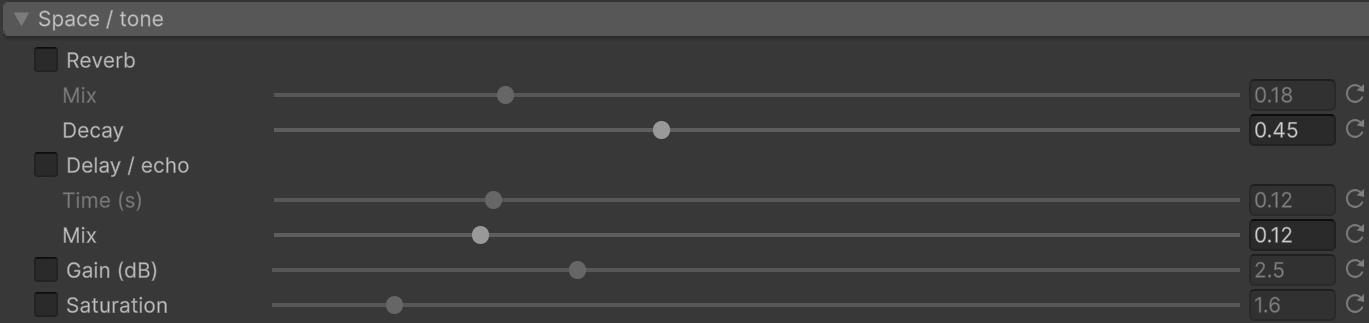
| Reverb | Short room tail. Mix and decay. |
| Delay / echo | Slap delay. Keep mix low for dialogue. |
| Gain (dB) | Presence boost around 3.5 kHz. |
| Saturation | Soft clip for warmth. |
Master polish

| Bus compression | Gentle glue on the finished mix. |
Stylized

| Chorus | Modulated delay. Usually off for dialogue. |
| Bitcrush | Lower bit depth and sample hold. |
| Pitch | Resample by semitones. Changes duration. Positive is higher and shorter. |
| Noise bed | Soft gated crackle under the voice. |
Voice Generator
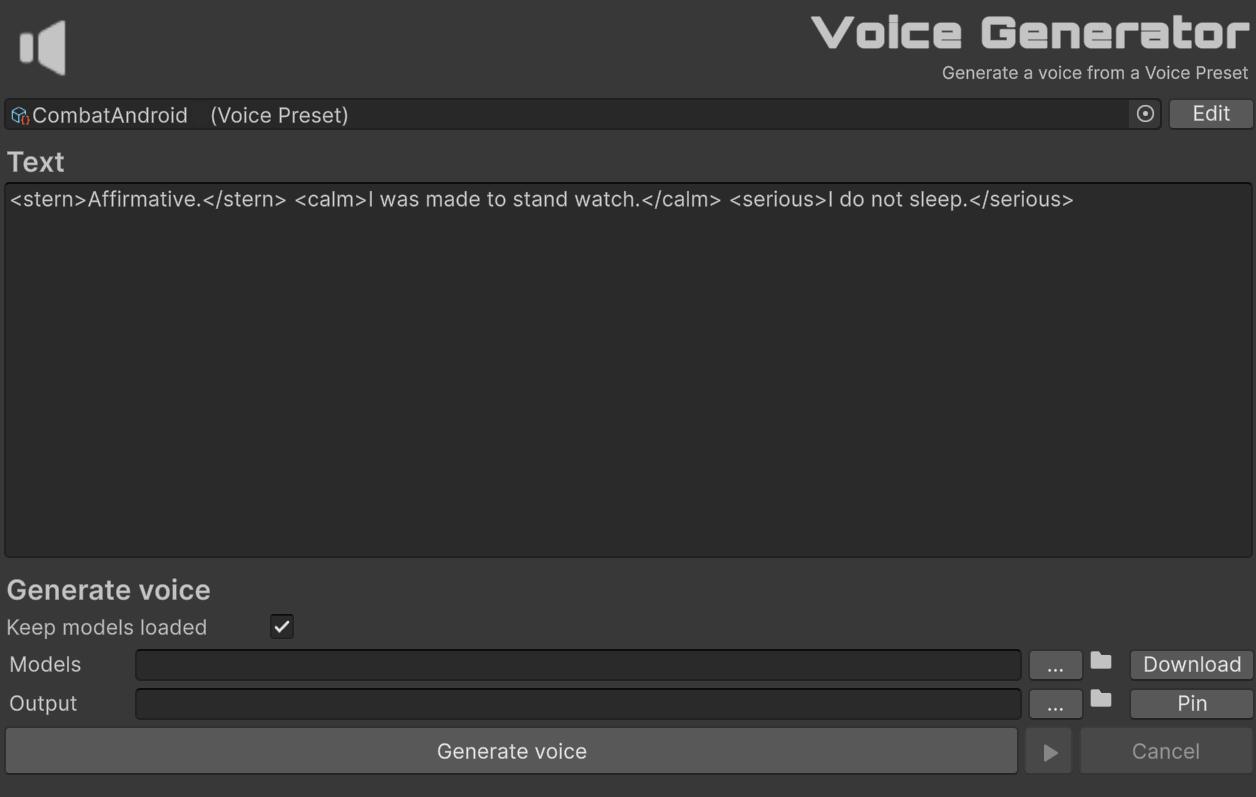
Assign a baked Voice Preset, write the spoken text, then Generate voice. Emotion tags are applied per block. Unknown names and unclosed tags are errors. Tags are not nested. Keep each generate to a short line or a few sentences; long dialogue or a full story in one go is much slower and will keep the machine busy.
These are the supported tags:
neutral |
calm |
content |
relieved |
happy |
joyful |
amused |
playful |
excited |
enthusiastic |
proud |
confident |
hopeful |
tender |
romantic |
warm |
friendly |
sympathetic |
sad |
melancholy |
lonely |
grieving |
disappointed |
angry |
irritated |
frustrated |
furious |
resentful |
fearful |
anxious |
nervous |
panicked |
surprised |
shocked |
amazed |
curious |
disgusted |
contemptuous |
sarcastic |
cynical |
bored |
tired |
embarrassed |
guilty |
ashamed |
serious |
stern |
authoritative |
determined |
dramatic |
intense |
mysterious |
cold |
detached |
suspicious |
triumphant |
Insert a pause with <silence>1</silence> (greater than 0, up to 5 seconds). Example:
Welcome to the keep.
<calm>The next checkpoint is quiet.</calm>
<silence>1</silence>
<happy>The reward is yours.</happy>| Preset | Baked VoicePreset. Edit opens Voice Preset. |
| Text | Spoken line, optional <emotion> tags, <silence>, and vocal events. |
| Keep models loaded | If enabled, GGUF weights stay in memory between runs. |
| Models | Folder that contains Voice.gguf. Download fetches it. |
| Output | Destination .wav path (mono, 24 kHz, 16-bit PCM). Pin highlights the clip in the Project window if it is inside the project. |
| Generate voice | Speaks from the baked speaker, concatenates segments, then applies the preset’s post-FX. |
Powered by a LORA of Vox CPM 2.
🛡️ Moderator
‘Local AI: Moderator’ classifies chat text on-device in runtime. Drop a Moderator component on a GameObject, then call Evaluate, IsFlagged, or Filter to score hateful, abusive, and threat content plus the protected group it appears to target.
- Private and local. Messages never leave the player’s machine. No cloud account and no API keys.
- Runtime. This asset is meant for play mode and player builds.
- ~15 ms per message on desktop GPUCompute. CPU is supported. WebGL falls back to GPUPixel, then CPU, and is much slower (several seconds).
- 23 languages: English, German, French, Dutch, Portuguese, Spanish, Italian, Polish, Danish, Swedish, Finnish, Hungarian, Czech, Slovak, Slovenian, Croatian, Bulgarian, Greek, Romanian, Lithuanian, Latvian, Estonian, Irish.
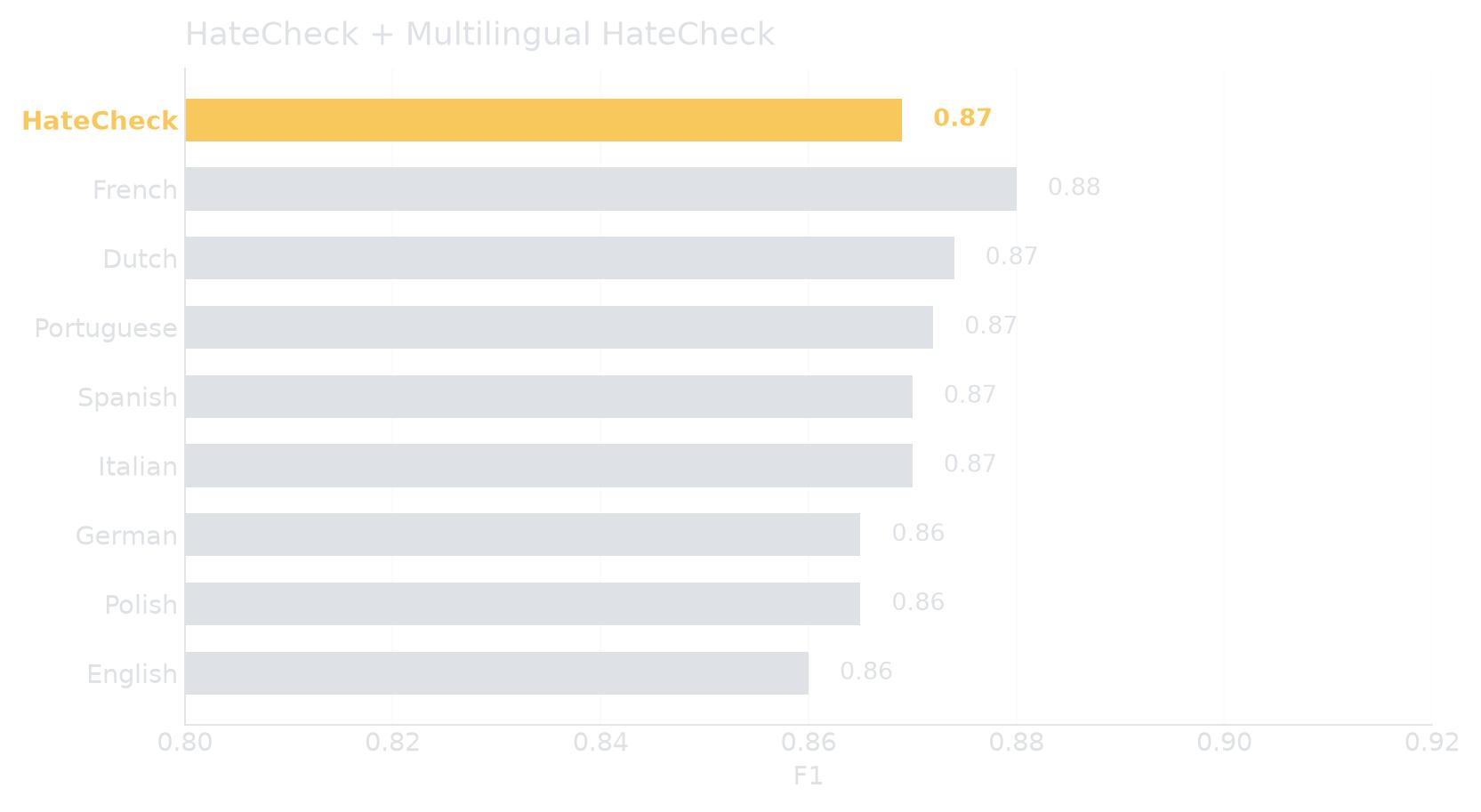
- HateCheck F1 0.87 (recall 0.96) on 29,797 cases. English HateCheck F1 0.86.
- Three content scores: hateful, abusive, threat. Ten target groups: race, colour, religion, descent, national/ethnic origin, sexual orientation, gender, disability, age.
- About 160 MB on disk for the included quantized
.sentismodel andtokenizer.json.
Flagged as a hint, not a guarantee.
Requisites
To ensure optimal performance and compatibility, your project must meet the following requirements:
- Unity: 6000.0 or higher.
- Unity Inference Engine 2.6.1 (
com.unity.ai.inference). The package pulls this in as a dependency. - GPU: recommended. Default backend is GPUCompute. CPU works. WebGL cannot run GPUCompute (no compute shaders). It tries GPUPixel, then CPU.
- Disk: about 160 MB for the model and tokenizer (includes a more accurate, non-quantized model).
Installation Guide
- Import Local AI: Moderator.
- Add Fronkon Games → Local AI → Moderator to a GameObject. Empty model and tokenizer fields are filled from the package when possible.
- Open the demo scene at
Assets/FronkonGames/LocalAI/Moderator/Demo/Moderator_demo.unity, or try the WebGL demo.
Default thresholds are 0.40 (hateful / target) and 0.50 (abusive / threat). Input is truncated at 128 tokens.
Component
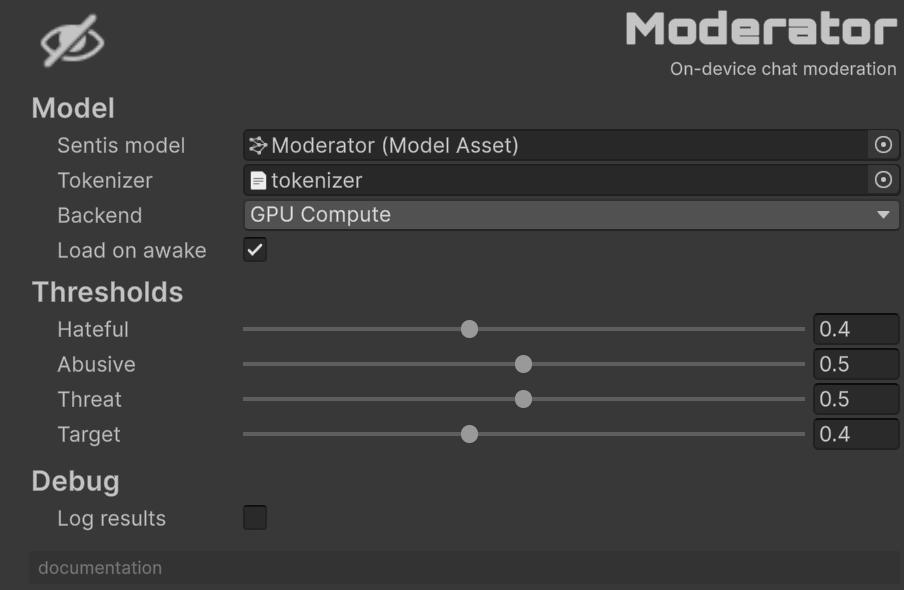
Model
| Sentis model | Quantized Moderator .sentis asset. |
| Tokenizer | tokenizer.json as a TextAsset. |
| Backend | GPU Compute is recommended on desktop. CPU always works. On WebGL, GPUCompute is not used. |
| Load on awake | Loads the model when the component wakes up. Disable this if you want to call Load() yourself. |
Thresholds
A category is flagged when its score is at or above the slider. Flagged is true when any content score (hateful, abusive, or threat) is over its limit.
| Hateful | Hate directed at a protected group. Default: 0.40. |
| Abusive | Insults and abuse. Default: 0.50. |
| Threat | Threats of violence. Default: 0.50. |
| Target | Used when you query a target group (Contains / GetScore with ModeratorTarget). Default: 0.40. |
Debug
| Log results | Writes each evaluation to the Console. |
The documentation link at the bottom of the inspector opens this page.
API
Namespace: FronkonGames.LocalAI.Moderator.
using FronkonGames.LocalAI.Moderator;

Moderator moderator = GetComponent<Moderator>();

if (moderator.IsReady == false)
  moderator.Load();

if (moderator.IsFlagged(message) == true)
{
  // Drop, mute, or replace the line.
}

ModeratorResult result = moderator.Evaluate(message);
if (result.Flagged == true)
{
  float hate = result.GetScore(ModeratorContent.Hateful);
  ModeratorTarget target = result.TopTarget;
}

string shown = moderator.Filter(message, "[blocked]");
Non-blocking (yields one frame so UI can show a busy state):
ModeratorResult result = await moderator.EvaluateAsync(message);| Evaluate | Runs inference and returns a ModeratorResult (scores, Flagged, strongest content and target). |
| EvaluateAsync | Same result, without stalling the current frame before the run. |
| IsFlagged / IsSafe | Convenience over Evaluate. Each call still runs inference. |
| Filter / TryFilter | Returns the original text when safe, otherwise a replacement (empty string hides the message). |
| Contains / GetScore | Query one content category or one target group. Prefer Evaluate if you need several scores. |
| Load / Unload | Load or release the Sentis worker. Safe to call Load more than once. |
| ActiveBackend | Backend the worker is actually using (may differ from Backend on WebGL). |
| Evaluated | Event raised after every successful evaluation. |
IsBusy is true while an evaluation is running. A second call at the same time throws.
How the demo flags messages
Moderator.Evaluate returns scores. result.Flagged is only one policy: any content head (hateful, abusive, threat) at or above its threshold.
The included demo does not stop there. It applies a small extra rule on top of those scores (if a content score is close to its limit, or a target group is very high, it boosts the strongest content score using how many target heads also fire). That is demo-only. It is not used by IsFlagged, Filter, or result.Flagged on the component.
There is no perfect way to turn scores into a yes/no. Chat, lobbies, kids’ games, and competitive servers all need different trade-offs (catch more hate vs. fewer false positives). Use the scores, thresholds, and target heads to write your own algorithm for that environment. The demo is an example, not a recommendation for shipping.
Languages
Trained for 23 languages. The demo and HateCheck eval cover English, German, French, Dutch, Portuguese, Spanish, Italian, and Polish. Other listed languages can work but are not scored in that suite.
| English | German | French | Dutch |
| Portuguese | Spanish | Italian | Polish |
| Danish | Swedish | Finnish | Hungarian |
| Czech | Slovak | Slovenian | Croatian |
| Bulgarian | Greek | Romanian | Lithuanian |
| Latvian | Estonian | Irish |
WebGL
WebGL cannot create a GPUCompute worker. The component tries GPUPixel, then CPU. Expect several seconds per message in the browser. On desktop GPUCompute it is about 15 ms.
🌐 Translator
‘Local AI: Translator’ translates game text offline inside the Unity Editor. Load a CSV of your strings, or paste a larger block, and translate it to 34 languages on your machine.
- Private and local. Source text and translations never leave your computer. No cloud account and no API keys.
- Editor-only. Tools live under Window → Fronkon Games → Local AI → Translator. Nothing is added to a player build.
- CSV spreadsheet. Open a localization table, edit cells, add language columns, then translate a cell, a column, or the whole file.
- Translator Block. Paste a quest description, README, or chunk of dialogue and translate it to a list of languages.
- Placeholders. Tokens such as
{PLAYER_NAME},{ITEM_ID}, and%dstay in the translation so your runtime substitution still works. - 34 languages, including English, Chinese, Japanese, Korean, German, French, Spanish, and more.
- CUDA, then Vulkan, then CPU. A GPU is not required. CUDA is used when a compatible NVIDIA GPU is present.
Requisites
To ensure optimal performance and compatibility, your project must meet the following requirements:
- Unity: 6000.0 or higher.
- Editor: Windows x86_64.
- GPU: not required. CUDA is used when a compatible NVIDIA GPU is present, then Vulkan, then CPU. A GPU is strongly recommended.
- VRAM: about 10 GB. An 8 GB card can run the quantized model; 12 GB is more comfortable.
- Disk: at least 10 GB of free space.
Installation Guide
- Import Local AI: Translator.
- Open Window → Fronkon Games → Local AI → Translator → Translator.
- Set the Models folder and click Download, or select a folder.
- Open a
.csvfile (a sample is atAssets/FronkonGames/LocalAI/Translator/Editor/Templates/demo.csv). - Click Translate, or Translate column / Translate cell, then Save.
For a pasted block instead of a file, use Window → Fronkon Games → Local AI → Translator → Translator Block.
Tools
Translator
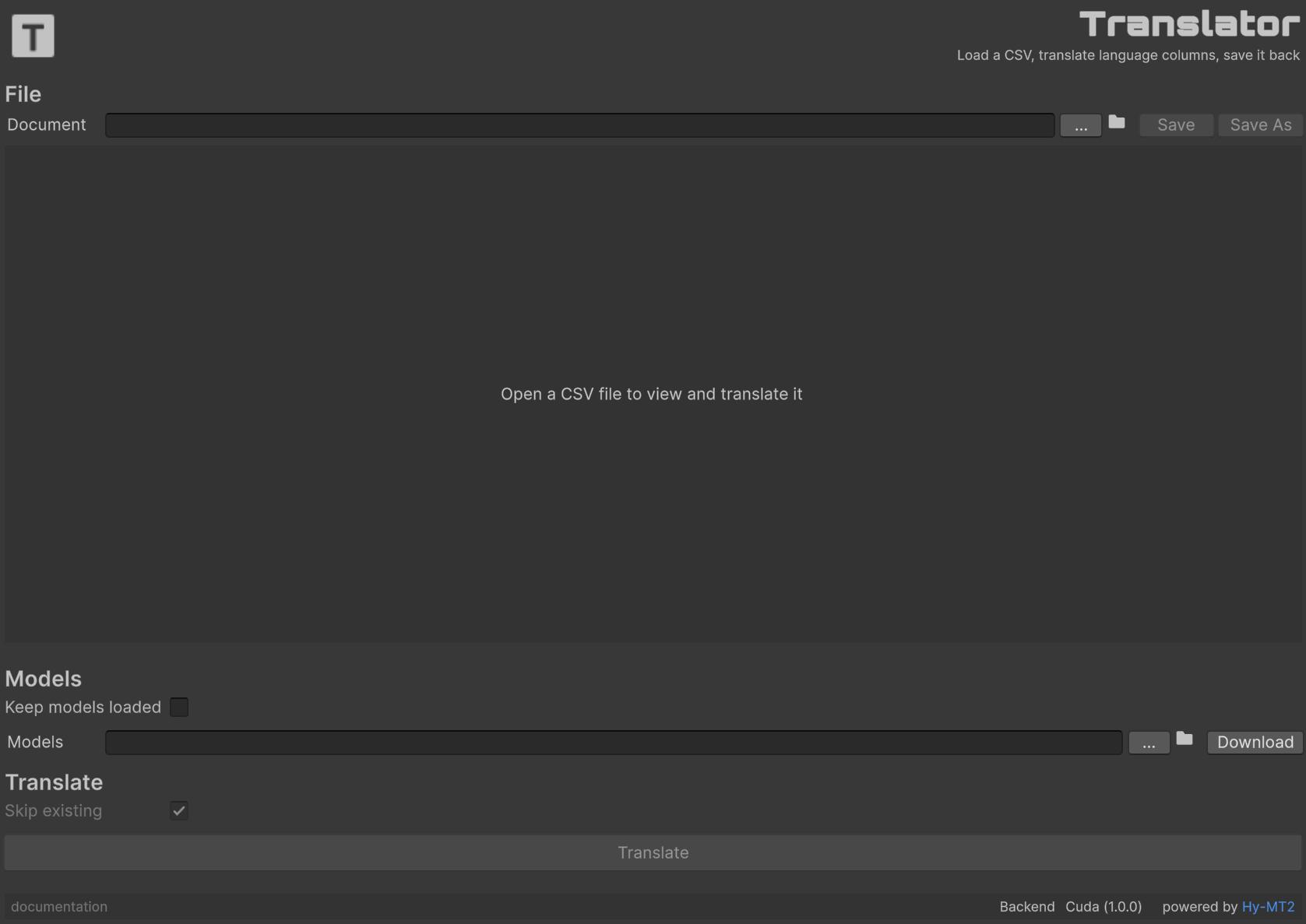
The CSV tool starts empty. Use … next to Document to open a file. Until a CSV is loaded, the viewer shows Open a CSV file to view and translate it.
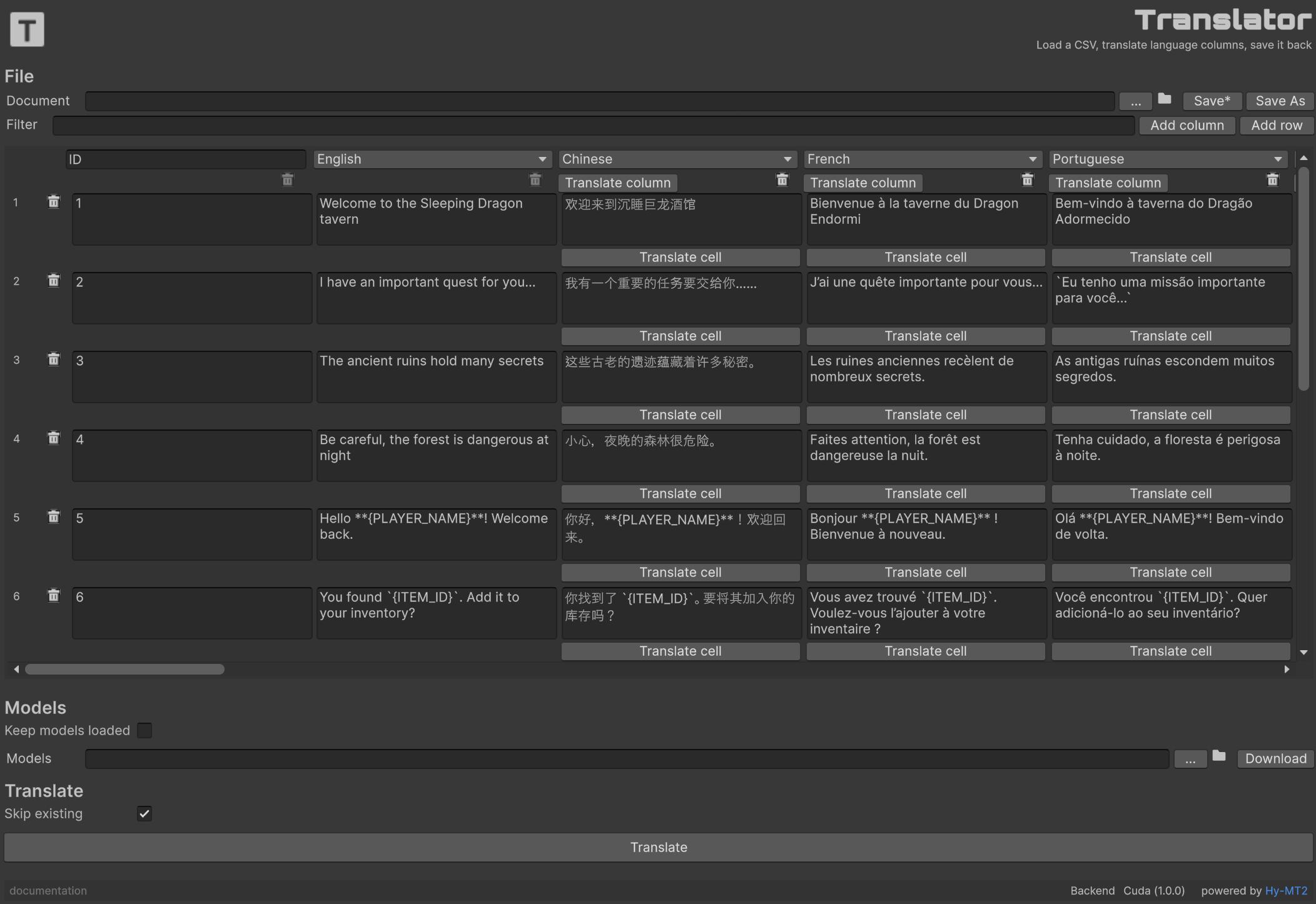
With a CSV loaded, the window is a spreadsheet: header row, editable cells, and translate buttons per column and per language cell. Native backends are tried in order: CUDA → Vulkan → CPU.
File
UTF-8 CSV, RFC 4180 (quoted fields, commas, newlines). The first row is the header.
| Document | Path of the .csv file. … opens one. The folder icon reveals it in Explorer. |
| Save | Writes the table back. Asks for confirmation. The label becomes Save* while there are unsaved edits. |
| Save As | Writes a new .csv file. |
Column layout:
- Column 1 is the ID. It is never translated. The header is a text field (default
ID). - Column 2 is the source language. Pick it from the language dropdown (default
English). Translate reads this column. - Remaining columns are target languages. Each header is a language dropdown. Translate column fills empty (or all) cells from the source. The trash icon removes that column.
A Unity Localization-style header such as Id,English,Spanish loads as ID, English source, Spanish target. Headers match case-insensitively. A name with a locale in parentheses, such as English (en), still matches English. Unsupported headers stay in the file but those cells cannot be translated until you pick a supported language.
Spreadsheet
| Filter | Shows rows that contain this text (any column, case-insensitive). |
| Add column | Menu of the 34 supported languages. Languages already in the table are disabled. |
| Add row | Appends an empty row. |
| Row trash | Removes that row after confirmation. |
| Translate cell | Translates one language cell from the source column. Always overwrites that cell. |
Placeholders
This tool is trained to translate the surrounding sentence and leave variable placeholders unchanged: names inside { }, printf tokens such as %d / %s, and forms like ${HP}. Do not wrap the token in extra wording that the model might treat as part of the name.
The included demo.csv uses this style. Examples:
Hello {PLAYER_NAME}! Welcome back.
You found {ITEM_ID}. Add it to your inventory?
Collect {COUNT} crystals before the timer expires.
Type /warp {LOCATION} to travel to the marked region.
{QUEST_TITLE} is now active. Speak to {NPC_NAME} for details.
Your score: {SCORE} / {TARGET_SCORE}
Use {KEY_ITEM} to unlock the door. Press E to interact.
Server returned: ERR_{ERROR_CODE}. Try again later.
You have %d lives remaining.
After translation, {PLAYER_NAME} should still be {PLAYER_NAME} in Spanish, Japanese, or any other target. Same for {COUNT}, {NPC_NAME}, %d, and the rest.
Models
| Keep models loaded | If enabled, GGUF weights stay in memory between batches (faster repeats, more RAM/VRAM). Unchecked, the model unloads when the batch ends. |
| Models | Folder that contains HY-MT2-7B-Q8_0.gguf. … picks a folder. The folder icon opens it. Download fetches the GGUF. |
Translate
| Skip existing | Leave cells that already have text untouched. Applies to Translate and Translate column. |
| Translate | Translates every supported target column in the loaded CSV. |
| Cancel | Stops the current batch. Shown while a translation is running. |
Languages
These 34 languages can be used as source or target.
| English | Chinese | Japanese | Korean |
| German | French | Spanish | Russian |
| Portuguese | Italian | Polish | Turkish |
| Traditional Chinese | Arabic | Indonesian | Thai |
| Vietnamese | Ukrainian | Dutch | Czech |
| Hindi | Malay | Filipino | Bengali |
| Urdu | Tamil | Telugu | Marathi |
| Gujarati | Hebrew | Persian | Cantonese |
| Kazakh | Uyghur |
Translator Block
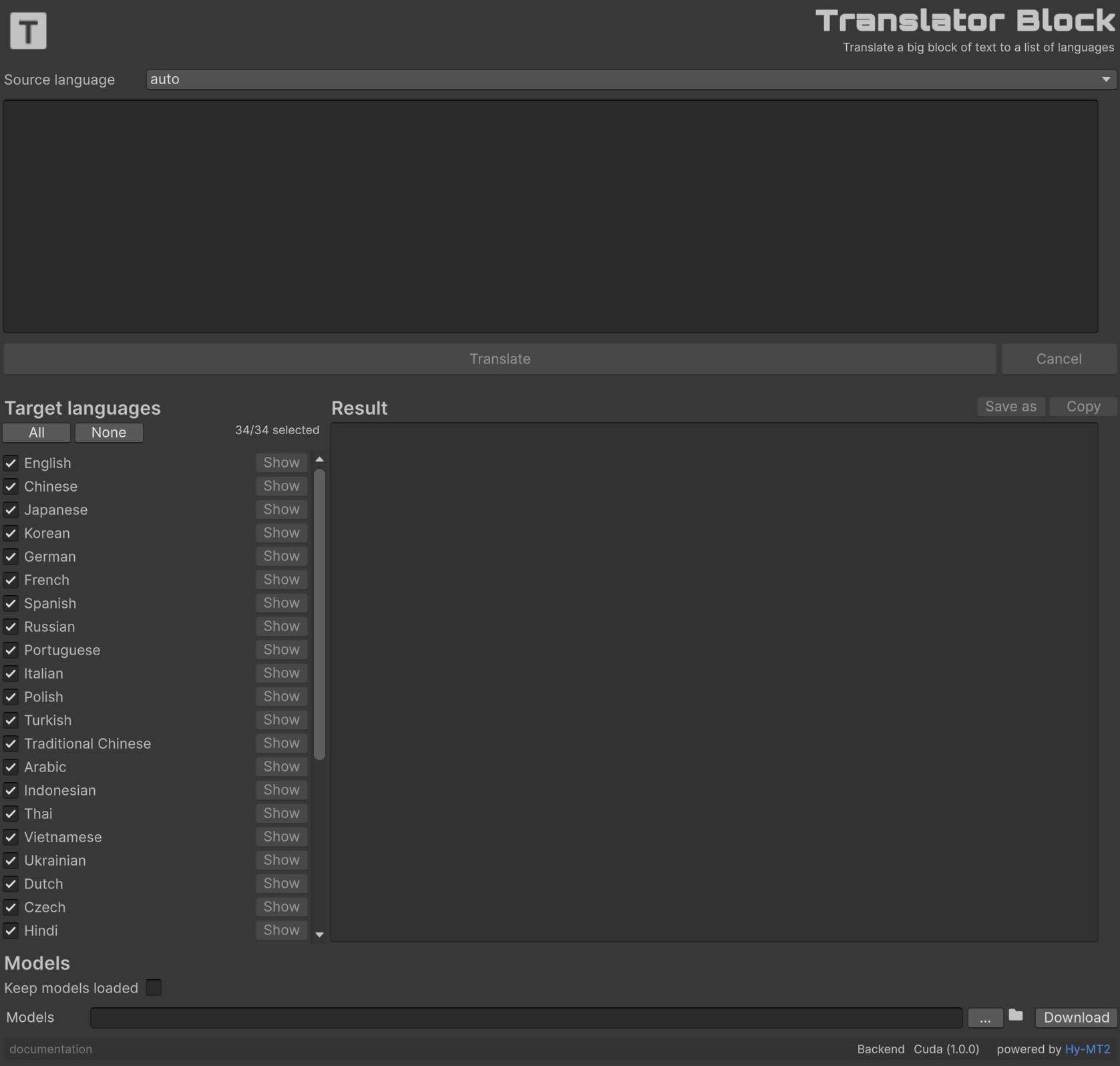
Paste a large block of game text (a quest, a README, a stretch of dialogue), pick the source language, check the targets, then Translate. Show on a language row displays that result. Copy and Save as export it.
Long text is split into segments that fit the model (paragraphs, then sentences, then byte-sized pieces when there are no breakers) and glued back with the original separators, so paragraph structure survives. A hash of the source is stored with the results: if you edit the block, the tool marks the results outdated until you translate again.
| Source language | Language of the pasted text. auto lets the model detect it. |
| Text | The block to translate. The Translate button shows the character count. |
| Cancel | Stops the current batch. |
| Target languages | Checked languages are translated. All / None toggles the list (34 languages). |
| Show | Displays the translated block for that language in the result pane. |
| Save as | Writes the selected result to a .txt file. |
| Copy | Copies the selected result to the clipboard. |
| Keep models loaded | Same as in Translator: leave weights in memory between batches. |
| Models | Folder that contains HY-MT2-7B-Q8_0.gguf. Download fetches it. |
Powered by Hy-MT2.
F.A.Q.
Why is Voice generation so slow on long text?
Short sentences are the intended workflow. A line or a short block is fine. Dialogue, narration, or a full story in one generate can take a long time and will often run the CPU at 100%. Give the machine plenty of RAM (32 GB recommended) and GPU memory (12 GB minimum, 16 GB more comfortable). NVIDIA uses CUDA when available; AMD cards use Vulkan, then CPU.
Why is Translator slow, or why does it fall back to CPU?
A GPU is strongly recommended. Native backends are tried in order: CUDA → Vulkan → CPU. CUDA needs a compatible NVIDIA driver; otherwise Vulkan is used, then CPU. CPU translation of a large CSV or a long block can take a long time. Keep Skip existing on so filled cells are not translated again.
Does Moderator or Translator need an internet connection?
No. Inference runs on the device. Nothing is sent to a server. Download is the only step that uses the network, to fetch model files.
Why is the WebGL demo slow?
WebGL has no compute shaders, so GPUCompute is not used. The demo falls back to GPUPixel or CPU. Expect several seconds per message in the browser. On a desktop GPU it is about 150 ms.
Will I run into any copyright issues?
Generated files are yours to ship in games or media (commercial or not).
You shouldn’t use this assets for other purposes besides generating assets for games or promotional material.
You cannot impersonate real people, plagiarize copyrighted works, or use it for illegal purposes.
It’s your responsibility.
Do I need to say that my game use AI?
It depends on the platform.
For example, on Steam you must disclose the use of generative AI if any AI-generated content or assets actually ship with your game or appear in your store and marketing materials.
Support
Do you have any problem or any suggestions? Send me an email to fronkongames@gmail.com and I’ll be happy to help you.
If you want to report an error, it helps a lot if you include the Unity log file.
If you are happy with this asset, consider writing a review in the store.
Thanks!
If you are happy with this asset, consider writing a review in the store.
Thanks!