Store
A comprehensive, physically-accurate ballistics simulation system for Unity that provides realistic trajectories, ricochets, penetration mechanics, and advanced ballistic effects for games requiring authentic projectile behavior.
- Physically Accurate: Implements real-world ballistics physics including gravity, air resistance, the full G1–G8 and Sphere (GS) drag models (Approximate or optional McCoy/JBM tables), advanced spin drift, Coriolis effect, and environmental effects.
- High Performance: Built on a custom lightweight Entity Component System (ECS) architecture with Unity Jobs and Burst compilation for optimal performance, capable of handling hundreds of simultaneous projectiles.
- Realistic Ricochets: Physically-based bullet deflection with angle-dependent probability and energy retention based on material properties.
- Advanced Penetration Mechanics: Energy-based projectile penetration through materials with realistic entry/exit behavior and stuck projectile handling.
- Comprehensive Material System: Extensive surface interaction properties with material-specific ballistic characteristics for different surfaces.
- Advanced Effects: Coriolis effect, Litz-based spin drift (with bullet-type coefficients, McCoy’s aerodynamic jump, transonic correction, yaw damping), headwind/crosswind decomposition, and the full 7-layer ICAO atmosphere up to 84 km.
- Realistic Shotguns: Named choke presets, Gaussian / choke-weighted patterns, size-aware birdshot spread, shot-column stringing, and per-pellet muzzle-velocity variation.
- Visual Feedback: Built-in tracer system (Built-in, URP, and HDRP shaders) and comprehensive debug visualization tools.
- Extensive Weapons Database: 380+ real-world weapons with authentic ballistic data including pistols, rifles, shotguns, machine guns, and sniper rifles.
- Educational FPS Demo: Complete SimpleFPS demo system showcasing all features with clean, documented code.
What Can Be Used For
✅ Realistic Ballistics Simulation: Accurate trajectories with proper physics for FPS, military, hunting, …
✅ Material Penetration: Realistic projectile behavior through different materials (wood, metal, concrete, etc).
✅ Ricochet Effects: Physically-based bullet deflection off surfaces .
✅ Long-Range Shooting: Precision ballistics for sniper games with environmental factors.
✅ Performance-Critical Games: Optimized for handling thousands of simultaneous projectiles.
What Is NOT
❌ FPS Controller: While it includes a SimpleFPS system, it’s designed for ballistics simulation, not as a FPS character controller.
❌ Visual Effects System: Focuses on physics simulation rather than muzzle flashes, explosions, or other visual effects.
❌ Weapon Animation System: Doesn’t handle weapon animations, reloading animations, or complex weapon mechanics.
❌ Audio System: Doesn’t provide comprehensive audio management beyond basic demo sounds.
❌ Networking Solution: Designed for single-player simulations, not multiplayer networking.
❌ Energy Weapons or Propelled Projectiles: Designed for ballistic projectiles only, doesn’t support laser weapons, plasma guns, or self-propelled projectiles like rockets and missiles.
Installation
Requirements:
- Unity 6000.0 LTS or newer.
Installation:
- Download and import the
True Ballisticsasset from the Unity Asset Store into your Unity project. - The asset ships with
Built-in,URP, andHDRPversions of theTracershader. The correct one is selected automatically based on the active render pipeline. - No additional setup is required. The asset is ready to use out of the box!
How to Use
The BallisticsManager component is the central hub of the ballistics system. It manages the lightweight ECS, handles projectile spawning, and coordinates all ballistic systems.
Create an empty GameObject and add the BallisticsManager component (Fronkon Games → True Ballistics → Ballistics Manager)
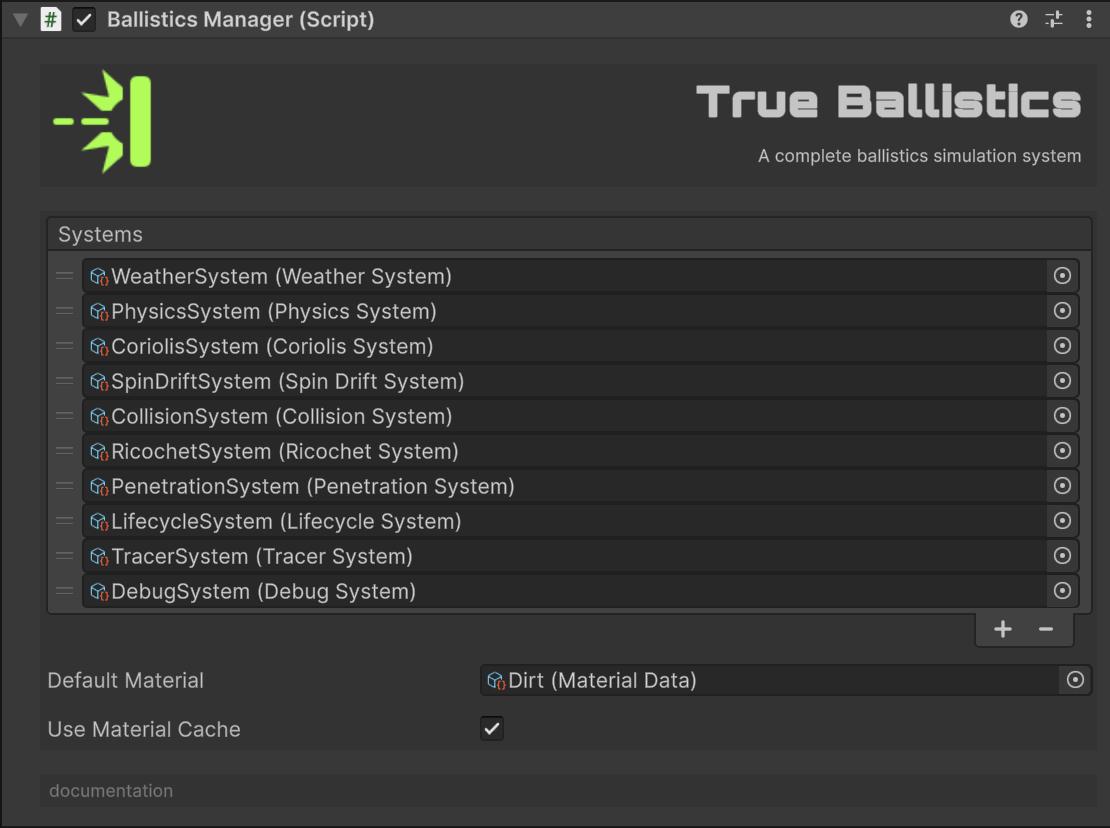
Ballistics Manager configuration:
Default Material: FallbackMaterialDatawhen a hit surface has noBallisticMaterial/ tag mapping.Use Material Cache: Caches resolved materials for performance (materials cannot change at runtime if enabled).Use Atmospheric Correction: Corrects published BCs for the activeWeatherSystematmosphere (altitude, barometer, temperature, humidity). Default on.Max Delta Time: Caps the per-frame simulation step taken fromTime.deltaTime(default 0.05 s). Hitch frames are clamped so frozen-force / large-Δt integration cannot reverse fast projectiles (especially shotgun pellets). Set to 0 to disable.
Add systems
Systems are modules that take care of a task. You can add as many as you want in Systems, this way you will only use the ones you need.
They are ScriptableObjects and therefore files. You can create them from the Project window (Fronkon Games → True Ballistics → Systems)
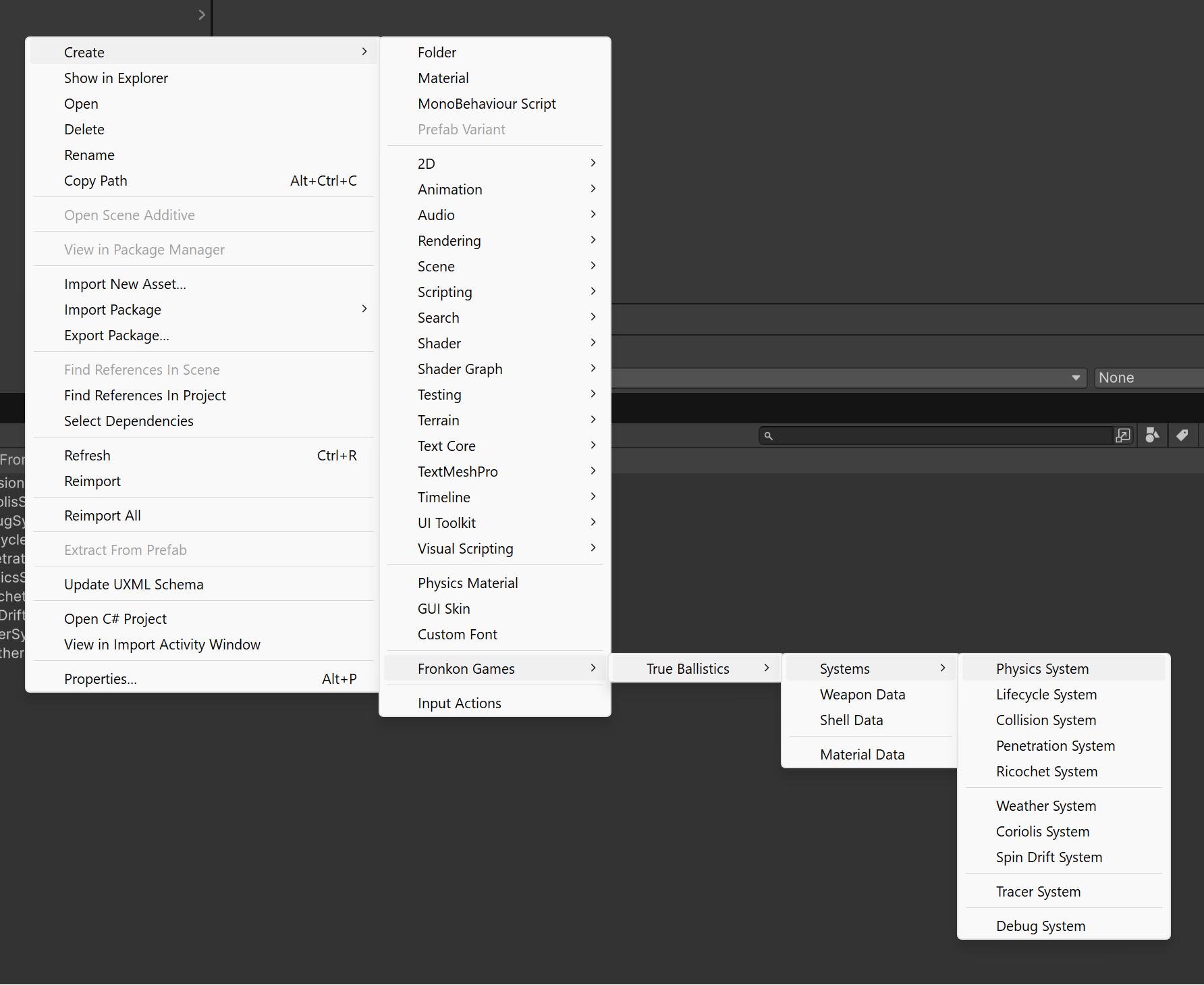
All the systems included are discussed in more detail below. The minimum recommended systems are:
- Physics System: without this system the projectiles would not move.
- Lifecycle System: is in charge of recycling projectiles. Without this system the projectiles would never be destroyed and when reaching the maximum number (5000 by default), no new ones would be created.
- Collision System: the one in charge of reporting collisions with projectiles.
Once these three systems are added, you can fire a projectile in this way:
// Get the manager instance
BallisticsManager manager = FindFirstObjectByType<BallisticsManager>();

// Spawn a projectile (flat ground, or as part of a guided weapon system)
int projectileEntity = manager.SpawnProjectile(
    weaponData,          // WeaponData ScriptableObject
    transform.position,  // Spawn position
    transform.rotation,  // Spawn rotation
    1.0f,                // Dispersion multiplier
    true,                // Can jam
    1.0f                 // Velocity multiplier
);

// Spawn a projectile at an incline (e.g. shooting uphill or downhill). The angle
// is added to the spawn rotation in the local pitch plane (positive = nose up).
// PhysicsSystem folds gravity into the bore frame so the bullet drops less going
// uphill and more going downhill, matching real-world behaviour.
int uphillEntity = manager.SpawnProjectile(
    weaponData,
    transform.position,
    transform.rotation,
    dispersionMultiplier: 1.0f,
    canJam:               true,
    initialVelMultiplier: 1.0f,
    shootingAngleDeg:     30.0f   // 30° uphill
);

// Spawn pellets (for shotguns)
manager.SpawnPellets(
    weaponData,          // WeaponData ScriptableObject
    shellData,           // ShellData ScriptableObject
    transform.position,  // Spawn position
    transform.rotation,  // Spawn rotation
    1.0f,                // Dispersion multiplier (weapon MOA)
    true,                // Can jam
    1.0f,                // Spread coefficient multiplier (0 disables pellet spread)
    1.0f,                // Initial velocity multiplier
    null,                // Optional List<int> to receive pellet entity ids
    float.NaN            // Shooting angle (NaN = use WeaponData.shootingAngle)
);
weaponData is another ScriptableObject (a file) with all the relevant data of a weapon model. You have more than 380 in the FronkonGames/TrueBallistics/Data/Weapons folder.
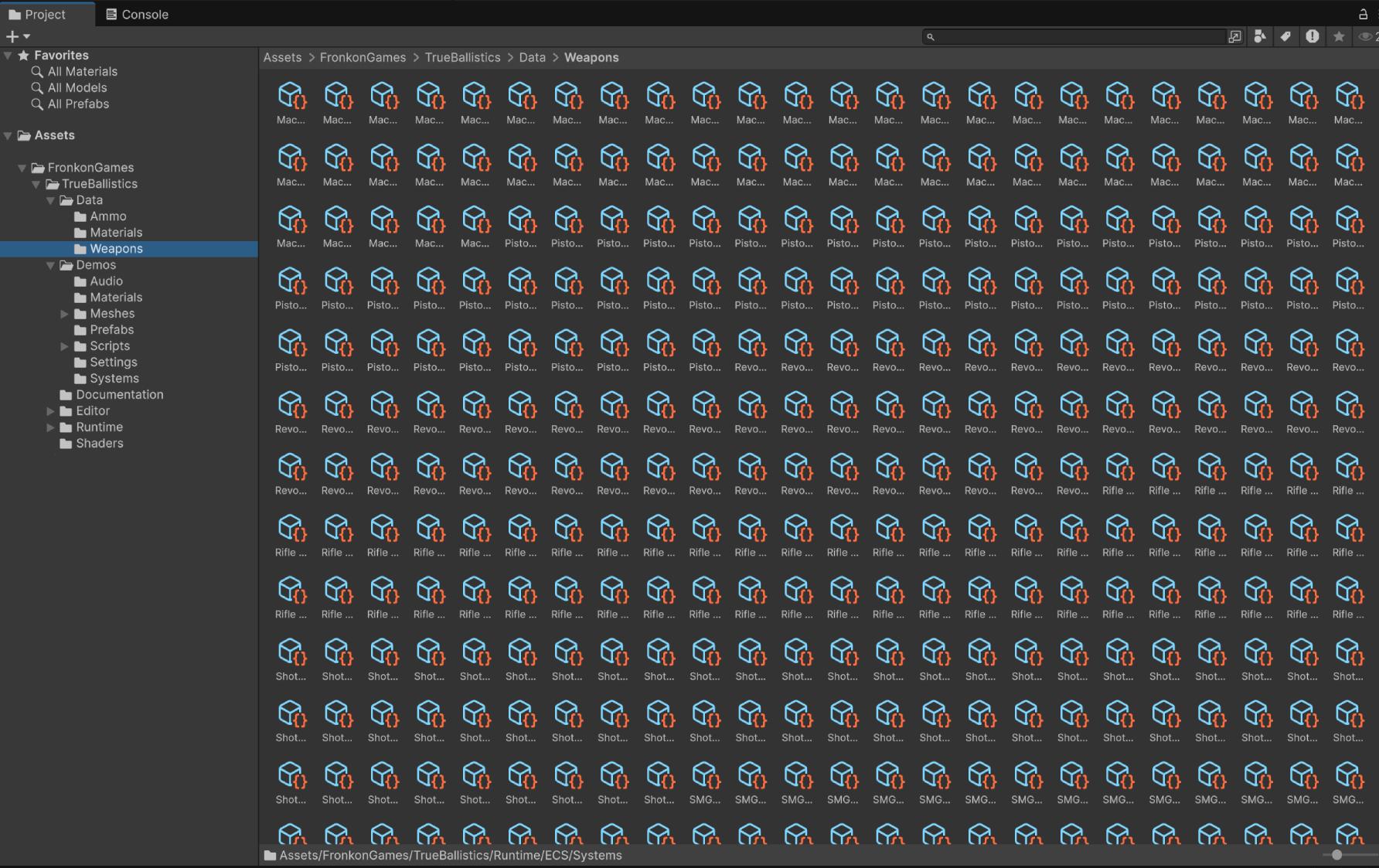
In the case of shotguns, in addition to the corresponding weaponData, you must add shellData, the type of cartridge you want to use. You can find several in FronkonGames/TrueBallistics/Data/Ammo.
You can create new weapons (and shells) from the Project window (Fronkon Games → True Ballistics → Weapon Data / Fronkon Games → True Ballistics → Shell Data).
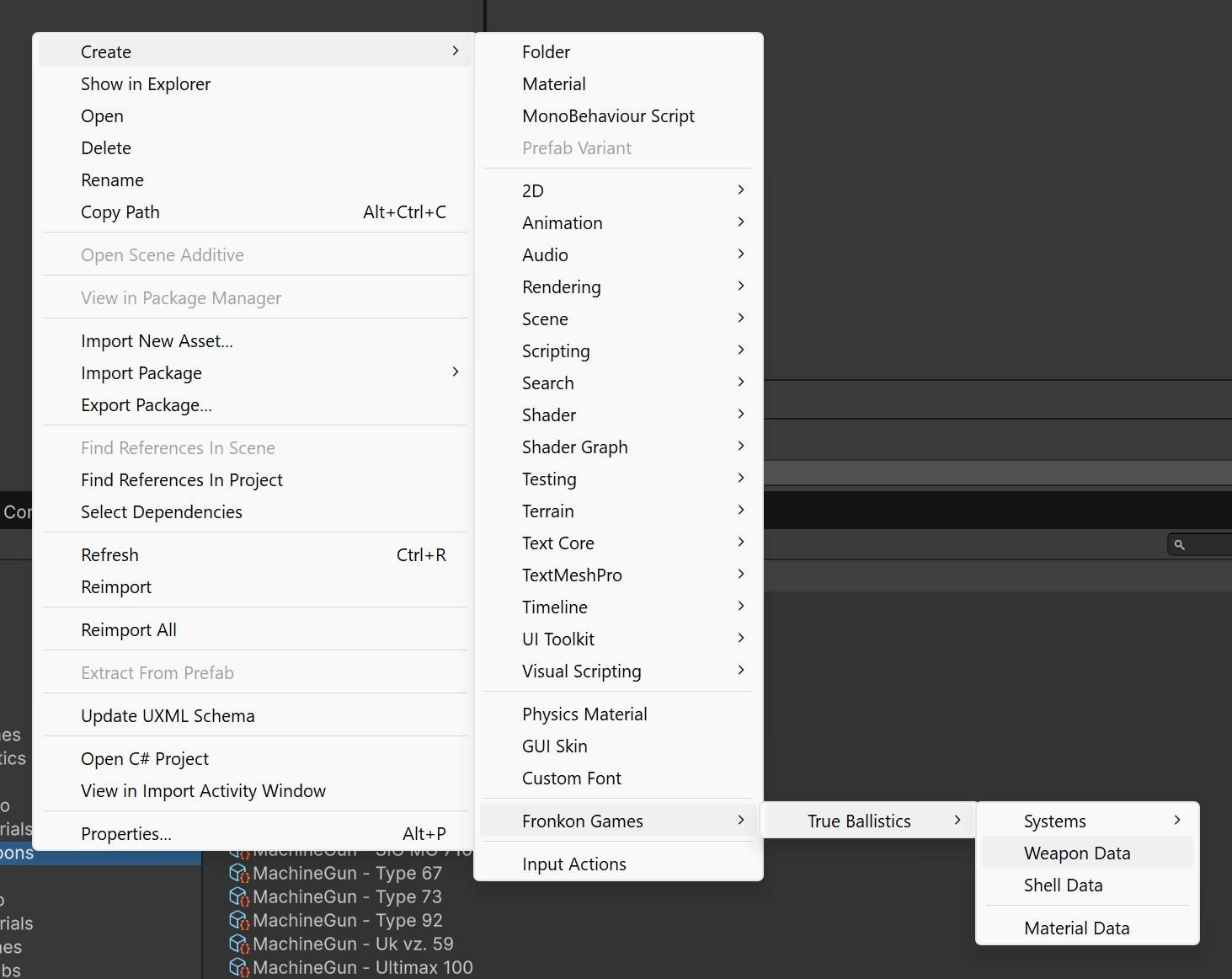
Shell Data configuration (shotguns):
Pellet Count/Pellet Diameter/Pellet Mass/Pellet Ballistic Coefficient: Per-pellet physical properties.Pellet Drag Model: Drag table for pellets. Defaults toSphere(GS), recommended for buckshot / spherical shot. Can also use G1–G8.Spread Coefficient: Radial spread rate in metres per metre of travel (tan of the pellet-cone half-angle).Spread Pattern:Uniform(even disk) orGaussian(denser near the centre , typical real patterns). DefaultGaussian.Choke: Named choke preset (Cylinder,Skeet,ImprovedCylinder,ImprovedSkeet,Modified,ImprovedModified,LightFull,Full,ExtraFull) orCustom. Named presets set the relative pattern diameter vs cylinder (Cylinder = 1.00 … Extra Full ≈ 0.40).Choke Factor: Used whenChokeisCustom(1 = open cylinder; ~0.5 ≈ full choke).Size Aware Spread: When on, smaller pellets (birdshot) get a wider angular spread than buck-sized shot (scale clamped 1–2.5× vs ~00 buck reference). Default on.Longitudinal Stringing: Extra forward-velocity σ as a fraction of muzzle velocity (shot-column lengthening). Default 0.01 (1%). 0 disables.Longitudinal Stringing Meters: Muzzle column-length σ in metres (pellets offset along the fire axis). Default 0.05 m. 0 disables.Muzzle Velocity Variation: Per-pellet fractional muzzle-velocity jitter (e.g. 0.02 = ±2%). Default 0.02.
This is an example of the weapons included:
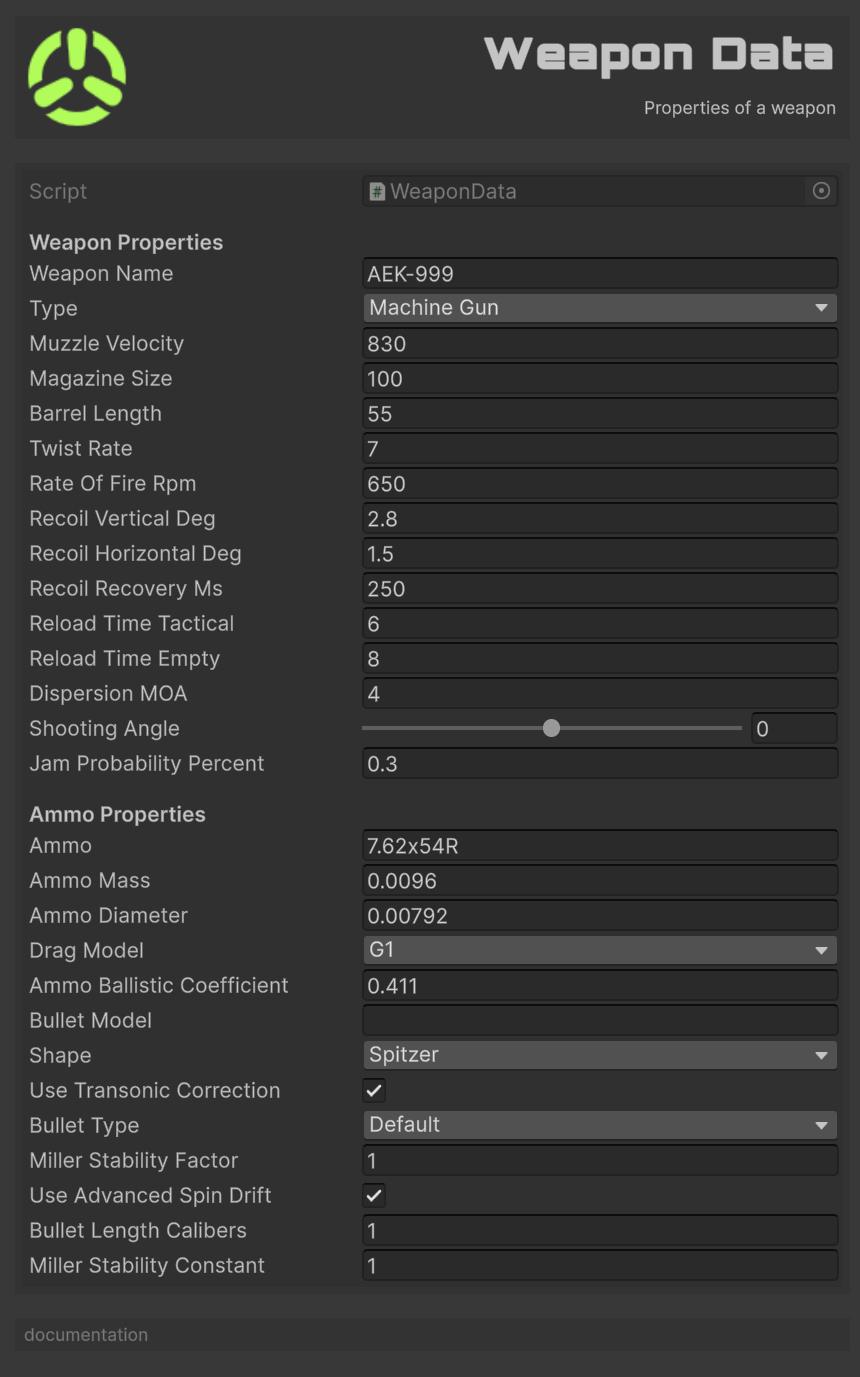
Configuration:
Weapon Name: The name of the weapon.Type: The type of weapon.Muzzle Velocity: The muzzle velocity of the ammo in meters per second.Magazine Size: The size of the magazine.Barrel Length: The length of the barrel in centimeters.Twist Rate: The twist rate of the ammo in inches per 1 meter.Rate Of Fire Rpm: The rate of fire in rounds per minute.Recoil Vertical Deg: The vertical recoil per shot in degrees.Recoil Horizontal Deg: The horizontal recoil per shot in degrees.Recoil Recovery Ms: The time it takes for recoil to recover in milliseconds.Reload Time Tactical: The time it takes to perform a tactical reload in seconds.Reload Time Empty: The time it takes to perform a reload from empty in seconds.Dispersion MOA: The dispersion of the weapon in Minutes of Angle (MOA).Jam Probability Percent: The probability of the weapon jamming, as a percentage.Ammo: The name of the ammo.Ammo Mass: The mass of the ammo in kilograms.Ammo Diameter: The diameter of the ammo in meters.Drag Model: The drag model of the ammo. One ofG1,G2,G3,G4,G5,G6,G7,G8, orSphere(GS, for spherical shot).G1andG7are the most common for bullets (G7 is preferred for modern boat-tail match bullets).G3covers flat-base lead bullets,G4is a theoretical/long-streamlined reference. The drag model is used together with the ballistic coefficient to compute drag in the physics step. Table density is selected onPhysicsSystem(ApproximateorMcCoy).Ammo Ballistic Coefficient: The ballistic coefficient of the ammo.Bullet Model: Optional bullet name (e.g. “Sierra MatchKing BT”, “Hornady ELD Match”). If set, used to resolve the projectile shape by substring match (“boat”/“bt” → BoatTail, “round”/“rn” → RoundNose, “flat”/“fb” → FlatBase). Falls back to the explicitShapefield if no match.Shape: Projectile shape.Spitzer(default, sharp pointed),RoundNose(blunt),FlatBase(wadcutter/cast),BoatTail(modern match). Affects the transonic drag correction (critical Mach, drag-rise shape, wave drag factor) inPhysicsSystem. WhenBullet Modelis non-empty, the resolved shape wins.Use Transonic Correction: If true,PhysicsSystemapplies a physics-based transonic drag correction based onShape. Disable if the G-table alone is known to be accurate enough for this bullet (rare).Bullet Type: Bullet type for the advanced spin-drift model. One ofDefault,Match(Sierra MatchKing, etc.),VLD(very-low-drag sleek),Hybrid(hybrid ogive),FlatBase. Affects the Litz coefficient, McCoy’s aerodynamic-jump factor, transonic correction, and yaw damping inSpinDriftSystem.Defaultuses the Match coefficients.Miller Stability Factor: Miller SG (≥ 1.0 is stable). Set to 0 to disable the advanced spin-drift model and use the legacy force-based version. Typical 1.0–1.5 for rifle bullets. Can be computed from the bullet specs withMillerStabilityUtility.Calculate.Use Advanced Spin Drift: If true (default),SpinDriftSystemuses the Litz-based advanced model. Disable to use the legacy force model.Bullet Length Calibers: Bullet length in calibers (dimensionless). Used byMillerStabilityUtilityto compute SG if the user doesn’t set it directly. Typical 1.0–1.5 for rifle bullets.Miller Stability Constant: Per-design factor for the Miller SG formula (C in the McCoy-style relation). 1.0 for standard projectiles, 1.5 for high-BC boat-tails that need less stability margin.
When Use Advanced Spin Drift is true and Miller Stability Factor > 0, the spawn pipeline also caches the air density (from WeatherSystem) and the bullet type into the runtime SpinDriftComponent so the hot path doesn’t look them up.
Systems
True Ballistics uses a custom lightweight ECS architecture optimized for ballistics simulation:
- Entities: Simple integer IDs representing projectiles (max 5000 concurrent).
- Components: Data structures (PhysicsComponent, DragComponent, etc).
- Systems: Logic processors that operate on entities with specific components.
Physics System
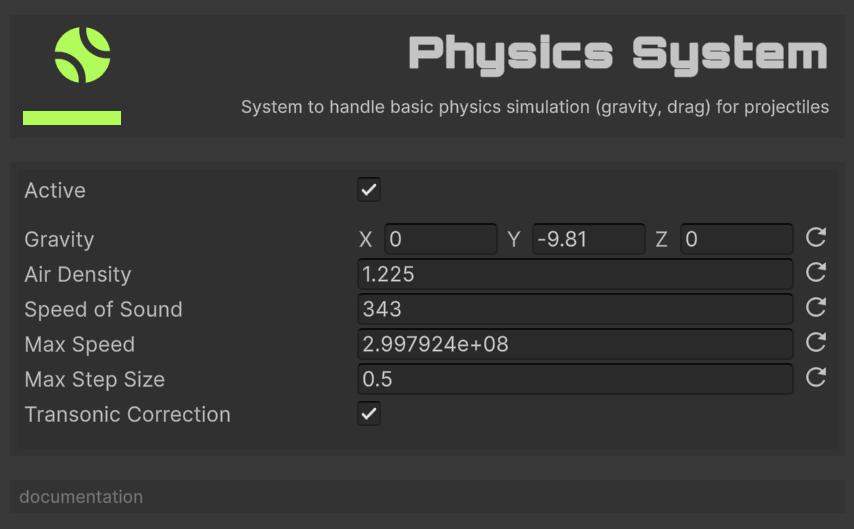
The engine room of True Ballistics. Every frame it gives each projectile a new, physically-plausible position and velocity by applying gravity, aerodynamic drag (with G1–G8 and Sphere tables , Approximate or optional McCoy/JBM , plus the shape-aware transonic correction), wind, and per-bullet spin drift and Coriolis deflection; then integrates the motion with adaptive sub-stepping and optional per-sub-step drag recalculation. In essence, it turns the static “bullet stats” you configure into the curved, wind-pushed flight paths you see in-game. Without this system the projectiles would not move.
Features:
- Configurable gravity vector (supports other planets).
- Air density simulation with altitude effects, humidity, and barometric pressure (from
WeatherSystemor the full 7-layer ICAO standard atmosphere). - Drag models G1, G2, G3, G4, G5, G6, G7, G8, and Sphere (GS).
- Optional McCoy / JBM dense Cd-vs-Mach tables (
Drag Table Source = McCoy) for training / validation;Approximatekeeps the faster coarse game tables. G3 and G4 always use Approximate (no McCoy set published for those forms). - Shape-aware transonic drag correction: on top of the G-table drag, applies a Prandtl-Glauert compressibility factor, a transonic rise (1.0 at Mach 0.8 → per-shape factor at Mach 1.2), and a Whitcomb-style wave drag, all modulated by
WeaponData.Shape(Spitzer / RoundNose / FlatBase / BoatTail). UseWeatherSystemor callAtmosphericCorrection.Correctto fold altitude/pressure/humidity into the BC itself. - Uphill / downhill gravity projection: per-bullet
shootingAnglein the bore frame, so the bullet drops less going uphill and more going downhill (matches real-world behaviour). - Adaptive sub-stepping: integration subdivides the per-frame step when a projectile would otherwise travel further than
Max Step Size(default 0.5 m), preventing velocity overshoot at the terminal phase, after ricochets, and for transonic high-BC rounds. - Recalculate Drag Per Sub-Step (default on): drag is recomputed from the current velocity on every integration sub-step, avoiding hitch / large-Δt velocity reversal with frozen-force Euler. Disable for a small speedup (previous behaviour).
- Wind effects and atmospheric conditions from the active
WeatherSystem. - Burst-compiled jobs for performance.
Configuration:
Gravity: Gravity vector (default: Earth’s 9.81 m/s²).- Moon: 1.62 m/s².
- Mars: 3.71 m/s².
- Jupiter: 24.79 m/s².
- Saturn: 10.44 m/s².
- Uranus: 8.87 m/s².
- Neptune: 11.15 m/s².
- Pluto: 0.62 m/s².
- Sun: 274.0 m/s².
- Venus: 8.87 m/s².
- Mercury: 3.70 m/s².
- Io: 1.796 m/s².
- Europa: 1.315 m/s².
- Ganymede: 1.428 m/s².
- Callisto: 1.235 m/s².
Air Density: Air density in kg/m³ (default value is 1.225 kg/m³ at sea level). If aWeatherSystemis registered and active, this value is overridden by its computed air density.- 0.001225 kg/m³ at 10,000 meters.
- 0.0001225 kg/m³ at 20,000 meters.
- 0.00001225 kg/m³ at 30,000 meters.
- 0.000001225 kg/m³ at 40,000 meters.
- 0.0000001225 kg/m³ at 50,000 meters.
Speed Of Sound: Speed of sound for Mach calculations (default value is 343 m/s at sea level). If aWeatherSystemis registered and active, this value is overridden by its computed speed of sound.- 295 m/s at 10,000 meters.
- 235 m/s at 20,000 meters.
- 196 m/s at 30,000 meters.
- 167 m/s at 40,000 meters.
- 145 m/s at 50,000 meters.
Max Speed: Maximum projectile velocity in m/s (default value is 299,792,458 m/s, the speed of light in vacuum).Max Step Size: Maximum integration step in metres. The integrator subdivides the per-frame step when a projectile would travel further than this inTime.deltaTime, preventing velocity overshoot at the terminal phase, after ricochets, and for transonic high-BC rounds. 0 disables sub-stepping. Default 0.5 m.Recalculate Drag Per Sub-Step: Recompute drag from current velocity on every integration sub-step. Safer for large timesteps; slightly more expensive. Default on.Drag Table Source:Approximate(coarse game tables, default) orMcCoy(dense JBM/McCoy tables). Change requires re-initialising the system (exit/enter Play Mode). G3/G4 stay Approximate under McCoy.Transonic Correction: Master switch for the shape-aware transonic drag correction. If false,PhysicsSystemskips the per-bullet transonic correction and uses the raw G-table value. Per-bullet override viaWeaponData.Use Transonic Correction. Default on.
If you add Debug System to the system list, you will be able to see the trajectories of the projectiles in the Scene window.
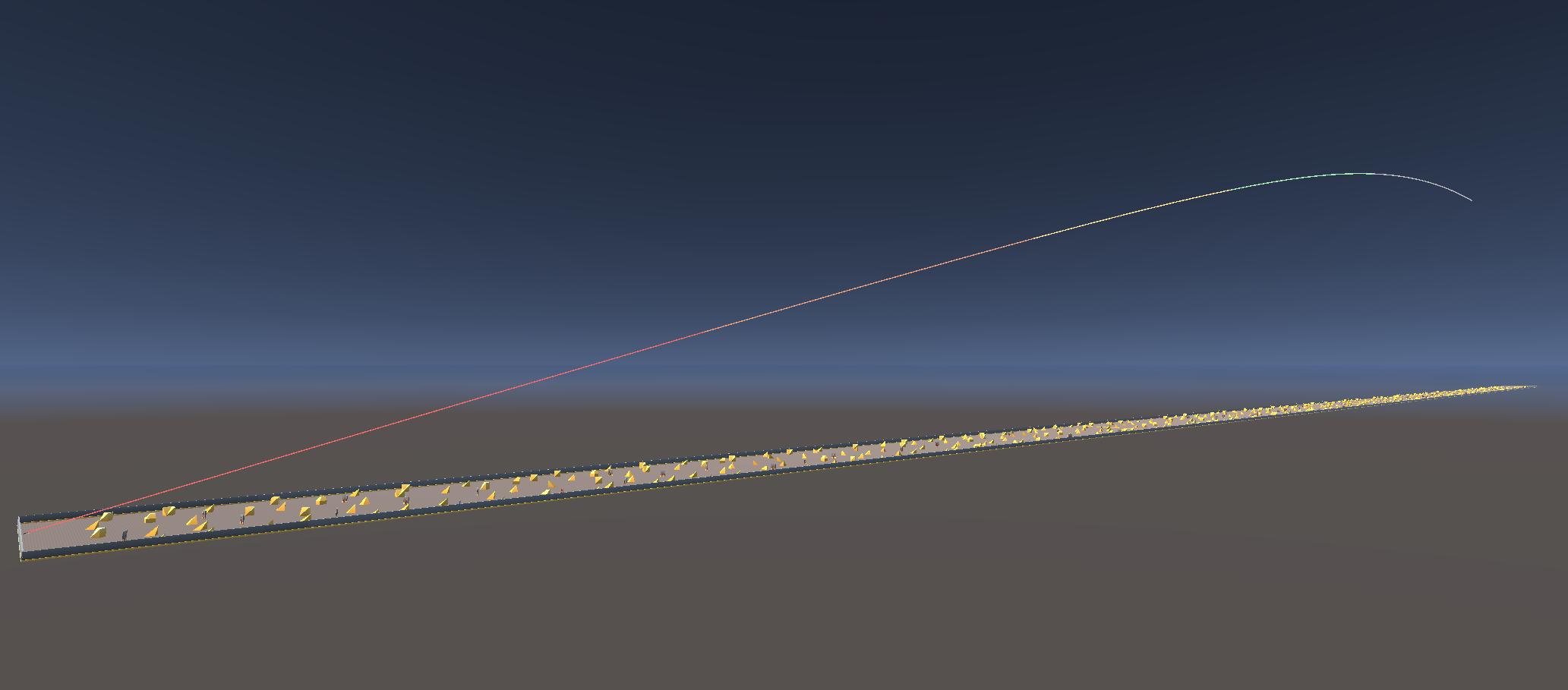
The trajectory of the projectile will have these colors:
| Color | Initial Velocity |
|---|---|
| Red | >=75% |
| Orange | >=50% |
| Yellow | >=25% |
| Green | >=10% |
| Gray | <10% |
Lifecycle System
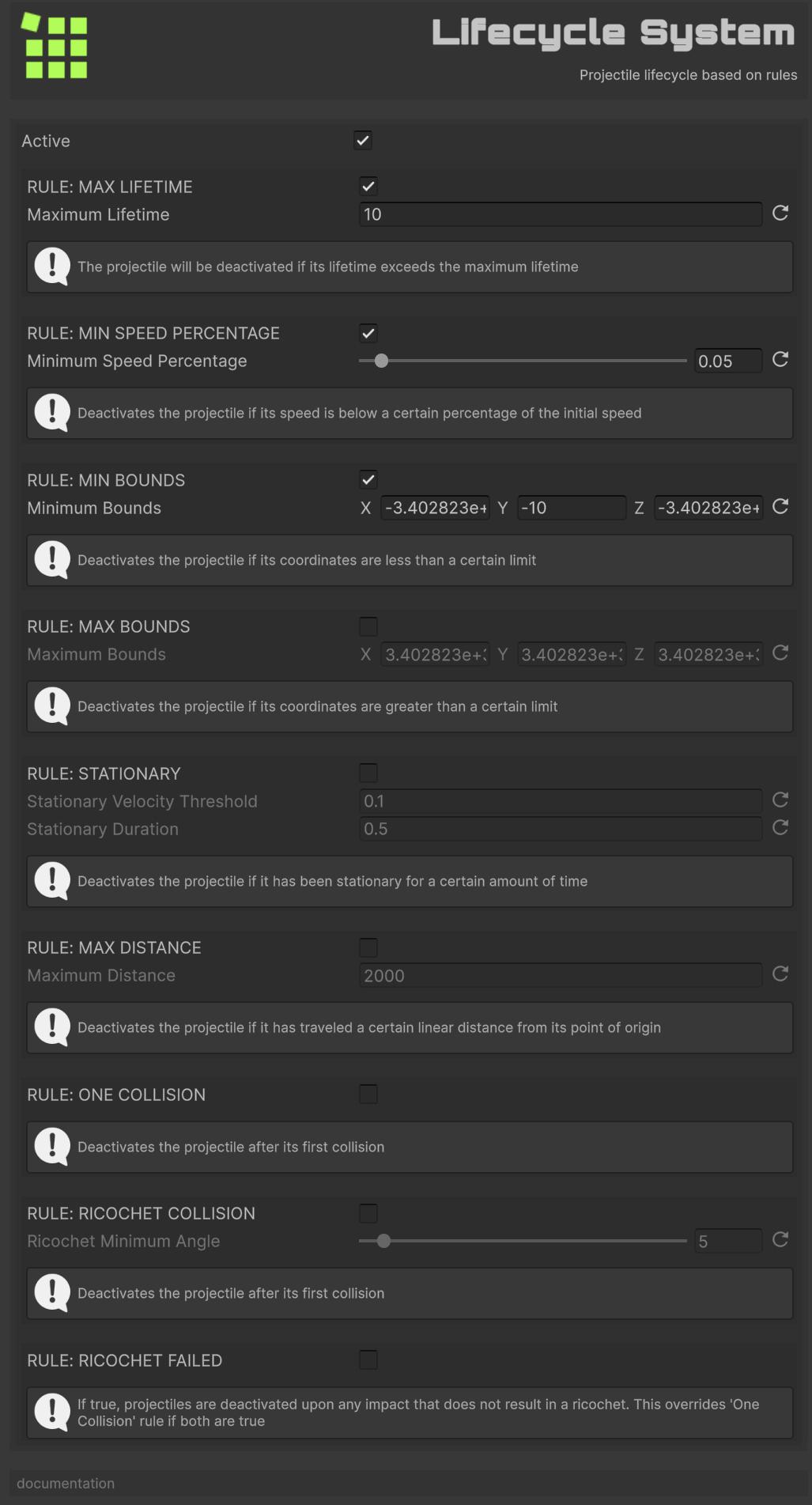
The house-keeper of True Ballistics. Inspects every projectile and safely removes those that have out-lived their time, slowed below a usable speed, strayed beyond configurable bounds, remained stationary too long, travelled too far, or finished their first (or failed) collision. In essence, it cleans up spent rounds so your scene stays lean and performant. Without this system the projectiles would never disappear.
If any of the following (active) rules are met, the projectile is deactivated.
Max Lifetime Rule
Deactivates the projectile if its lifetime has exceeded a certain limit.
Min Speed Percentage Rule
Deactivates the projectile if its speed is below a certain percentage.
Min Bounds Rule
Deactivates the projectile if its coordinates are less than a certain limit.
Max Bounds Rule
Deactivates the projectile if its coordinates are greater than a certain limit.
Stationary Rule
Deactivates the projectile if it has been stationary for a certain amount of time.
Max Distance Rule
Deactivates the projectile if it has traveled a certain linear distance from its point of origin.
One Collision Rule
Deactivates the projectile after its first collision.
If you use the Ricochet System, a bouncing projectile does not count for this rule.
Ricochet Rule
Deactivates the projectile if a ricochet occurred with an angle lower than a certain limit.
Ricochet Failed Rule
If true, projectiles are deactivated upon any impact that does not result in a ricochet. This overrides One Collision Rule if both are true.
Recycle Oldest When Full Rule
When the entity pool is full (5000 by default), despawn the oldest active projectile (by LifecycleComponent.spawnTime) and reuse its slot instead of failing to spawn. Useful for high pellet counts under stress (e.g. rapid shotgun fire). The system must be active and registered; CreateEntity asks LifecycleSystem.TryRecycleOldest() when the free list is empty. Default off.
Collision System
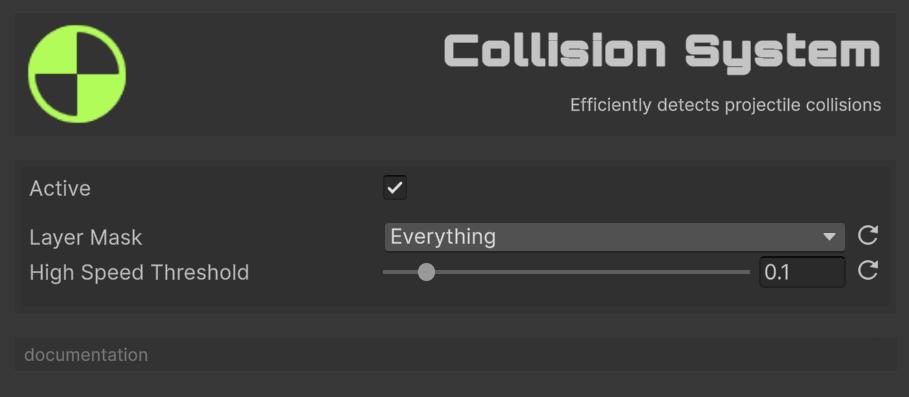
The gate-keeper of True Ballistics. Checks each projectile’s path and decides whether it has struck something, using precise RayCasts for hypersonic rounds and efficient batched SphereCasts for everyone else, then fires events that let ricochet, penetration, VFX and damage systems do their work. In short, it turns flying bullets into meaningful impacts your game can react to. Without this system the projectiles would pass straight through every surface.
Features:
- Raycast for high-speed projectiles.
- Batched SphereCasts for regular projectiles.
- Configurable layer masks.
- Automatic material detection.
Configuration:
Layer Mask: Collision layers.High Speed Threshold: Percentage of the speed of light (default 10%) at which RayCast is used instead of SphereCast (the projectile is considered instantaneous).
Once added to the systems, you can subscribe to the OnProjectileHit events to receive information on each impact.
CollisionInfo includes entity, point, normal, collider, impactEnergy, and , since 1.2.0 , snapshotted projectile mass and velocity at hit time. Prefer those fields over reading PhysicsComponent after the event: another subscriber (e.g. Lifecycle One Collision) may already have despawned the entity.
// Cache all colliders on this object and its children for efficient hit detection
colliders = this.GetComponentsInChildren<Collider>();

// Get the manager instance
BallisticsManager manager = FindFirstObjectByType<BallisticsManager>();

// Subscribe to projectile hit event (don't forget to unsubscribe)
ballisticsManager.OnProjectileHit += OnProjectileHitHandler;

...

private void OnProjectileHitHandler(CollisionInfo info)
{
  // Skip processing if collision info is invalid
  if (info.collider == null)
    return;

  // Momentum is available even if the entity was already despawned by another listener
  Vector3 momentum = info.mass * info.velocity;

  // Check if the hit collider belongs to this object (or any of its children)
  foreach (Collider c in colliders)
  {
    if (c != null && info.collider == c)
    {
      // Doing something
      break;
    }
  }
}
Check these classes in FronkonGames/TrueBallistics/Demos/Scripts for more examples:
- Coin: A coin that oscillates and disappears upon impact.
- DestroyOnHit: The object is destroyed on impact.
- NonKinematicOnHit: Changes a Kinematic object to Non Kinematic on impact.
- RigidBodyManager: Applies a momentum impulse to non-kinematic Rigidbodies using
CollisionInfo.mass/velocity.
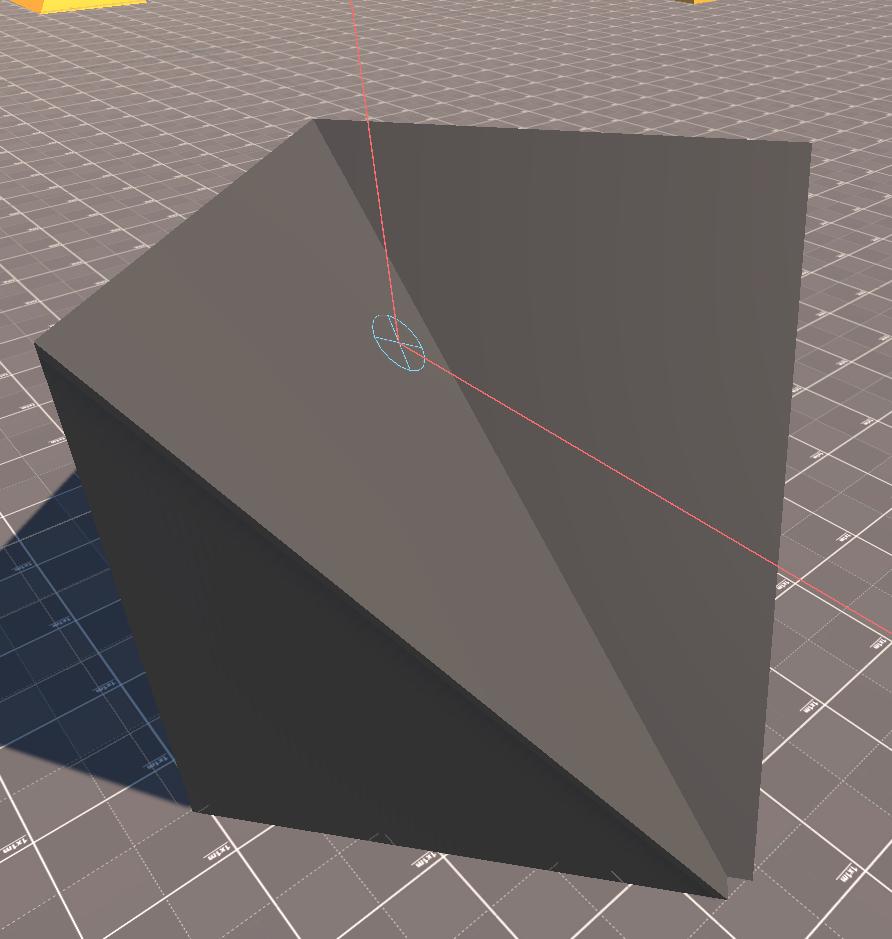
If you add Debug System to the system list, you will be able to see the impacts of the projectiles (a circle with a diagonal cross) in the Scene window.
RigidBodyManager class to see an example of how to do it , it uses the mass/velocity carried on CollisionInfo, so it still works if Lifecycle One Collision despawns the entity first.
HolesManager and SparksManager classes. Both solutions are quite rudimentary (enough for the purposes of the demo) so I do not recommend using them in production environments.
Ricochet System
The rebound artist of True Ballistics. Whenever a projectile’s impact event arrives, it consults the surface’s ricochet curve and the strike angle to decide: should this round skip off the material or stop dead? If a bounce is warranted it recalculates the outgoing velocity using the surface’s restitution and energy-retention factors, updates the projectile’s flight path in-place, and notifies the rest of the framework (VFX, sound, gameplay logic) through a dedicated ricochet event. If the angle or material rejects the bounce it raises a “ricochet failed” event so penetration or simple impact logic can take over. Without this system the projectiles would never ricochet – every hit would be a full stop or a penetration attempt.
Features:
- Probability-based ricochet calculation.
- Physically-based velocity changes.
- Material-specific restitution.
- Energy retention modeling.
Once added to the systems, you can subscribe to the OnProjectileRicochet events to receive information on each ricochet.
Collision System, an OnProjectileHit event will also be emitted.
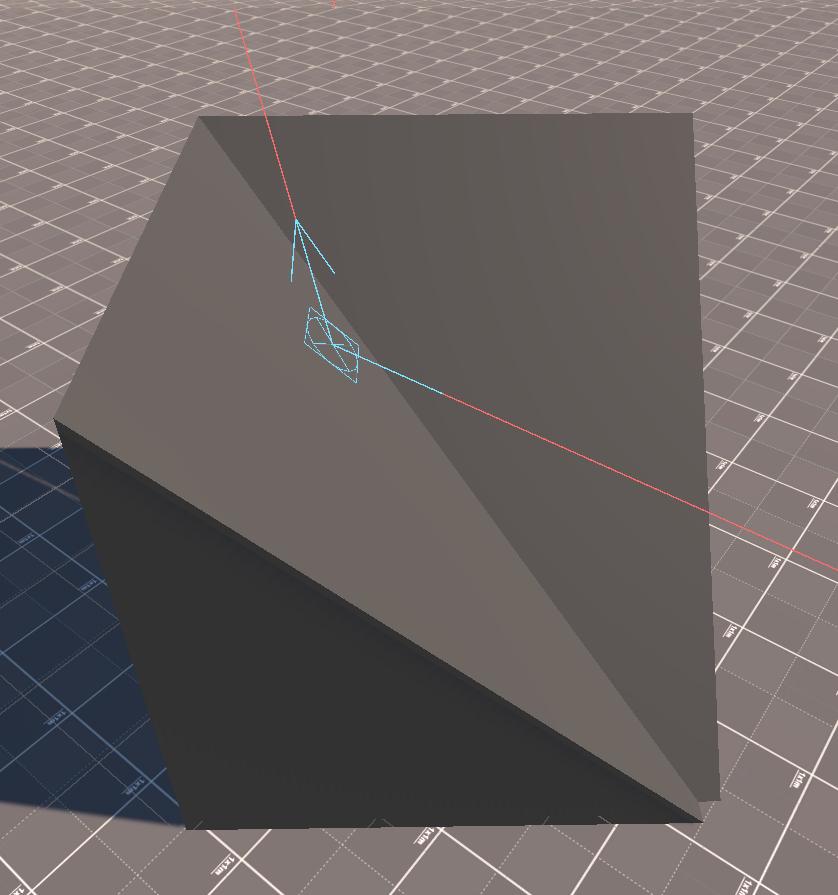
If you add Debug System to the system list, you will be able to see the ricochets (a square with an arrow indicating rebound) in the Scene window.
Penetration System
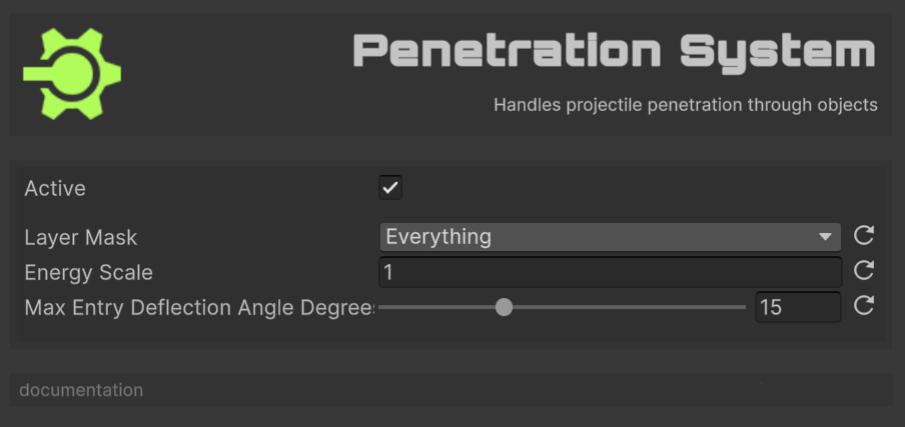
The wall-breaker of True Ballistics. When a projectile strikes and doesn’t ricochet, this system decides whether it bores straight through, deflects inside the material, or grinds to a halt. It measures the round’s kinetic energy against the surface’s yield strength and density, calculates how much power is lost tearing an entry plug and ploughing through the medium, and ray-traces ahead to locate a plausible exit point. Each frame it advances the slug through the obstacle, subtracts drag and fracture work, and updates velocity until it either bursts out the far side (firing “penetration enter” and “exit” events) or becomes embedded (“stuck” event). Without this system the projectiles would stop at the first hit, no through-walls, no over-penetration thrills.
Features:
- Entry/exit point calculation.
- Energy consumption modeling.
- Path deflection on entry.
- Stuck projectile handling.
Configuration:
Layer Mask: Layers considered for penetration raycasts.Energy Scale: Scaling factor applied to material strength when computing required energy. Lower than 1.0 will make the projectile more likely to penetrate.Max Entry Deflection Angle: Maximum angle in degrees by which a projectile’s path can be deflected upon entering a surface, based on incidence angle.
This system (and actually Collision and Ricochet) uses Ballistic Material for its calculations. If you do not assign any material to the objects, it will use Default Material from Ballistic Manager (see above). If you do not assign any, the ‘Concrete’ material will be used.
In the FronkonGames/TrueBallistics/Data/Materials folder you have a few materials already defined. You can also create your own (they are ScriptableObjects) from the Project window and using the menu Fronkon Games → True Ballistics → Material Data.
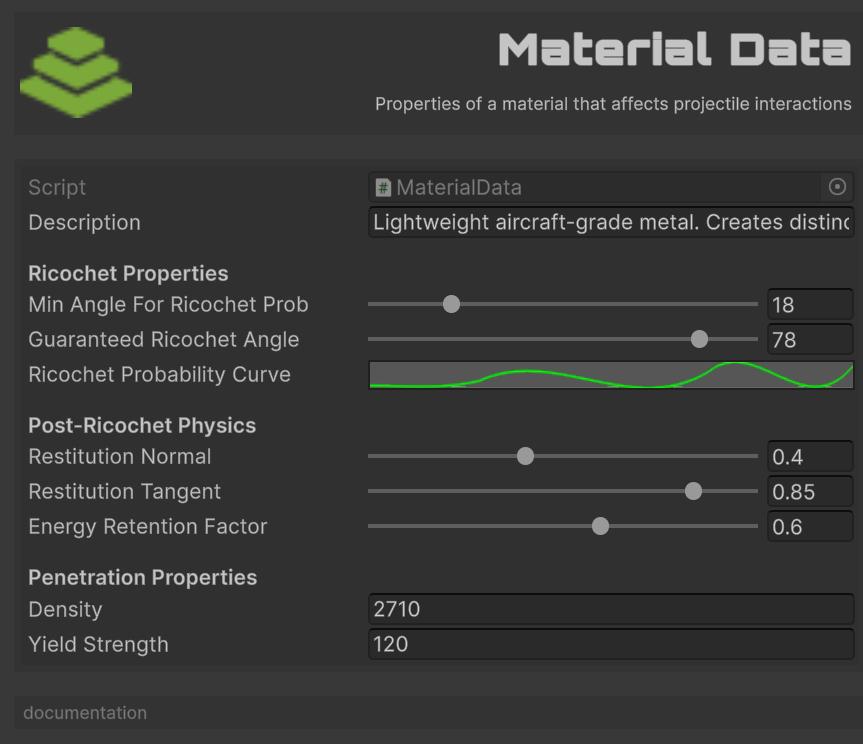
Configuration:
Description: Description of the material.Min Angle For Ricochet Prob: Angle (degrees) from surface normal. Impacts at angles greater than this (grazing angles) have increasing ricochet probability.Guaranteed Ricochet Angle: Angle (degrees) from surface normal. Impacts at angles greater than this (very grazing angles) will always ricochet if probability is met.Ricochet Probability Curve: Curve defining ricochet probability (Y-axis, 0-1) based on impact angle with surface normal (X-axis, 0-90 degrees). Higher angles = more grazing.Restitution Normal: Coefficient of restitution for the velocity component normal to the surface (0 = no bounce, 1 = perfect bounce).Restitution Tangent: Coefficient of restitution for the velocity component tangential to the surface (0 = sticks, 1 = no friction).Energy Retention Factor: Overall percentage of kinetic energy retained after ricochet (0 = all lost, 1 = all retained). Applied AFTER restitution effects if both are used conceptually.Density: Density of the material in kg/m^3. Used for penetration calculations.Yield Strength: Yield strength of the material in MPa. Higher values resist penetration.
Add the Ballistic Material component to the objects you want to specify a material. Remember that they must be at the same level as the collider that detects the impact.
Ballistic Material you can activate Use Material Cache to improve performance, but note that if you do so, you will not be able to change at runtime the material of the objects.
Three events related to projectile penetration are use:
- OnProjectilePenetrationEnter: When a projectile penetration starts (enters an object).
- OnProjectilePenetrationExit: When a projectile exits an object after penetration.
- OnProjectilePenetrationStuck: When a projectile gets stuck inside an object.
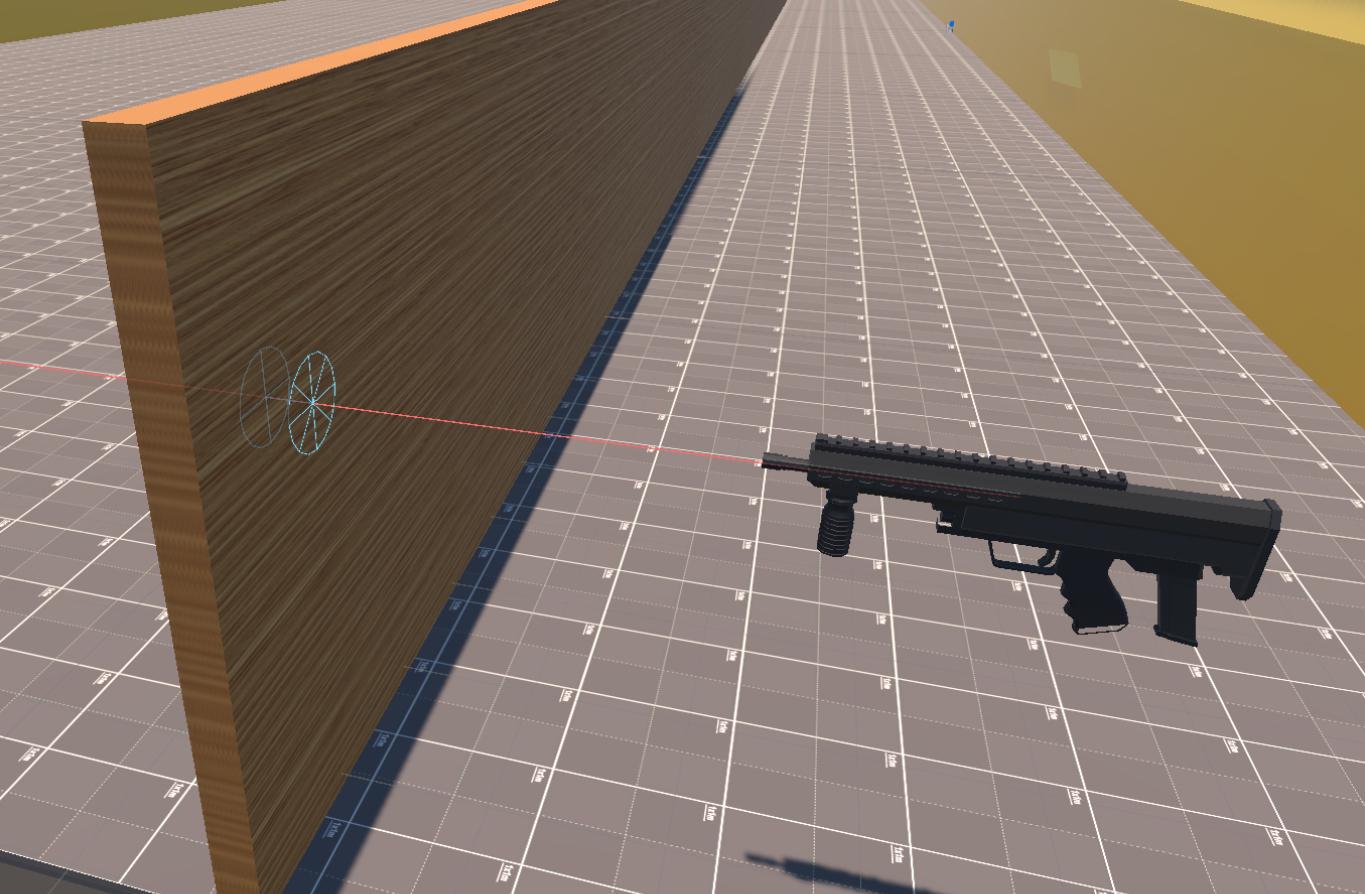
If you add Debug System to the system list, you will be able to see the the entry point (a circle with a vertical cross), the trajectory (in cyan color) and the exit point (a circle with a vertical cross).
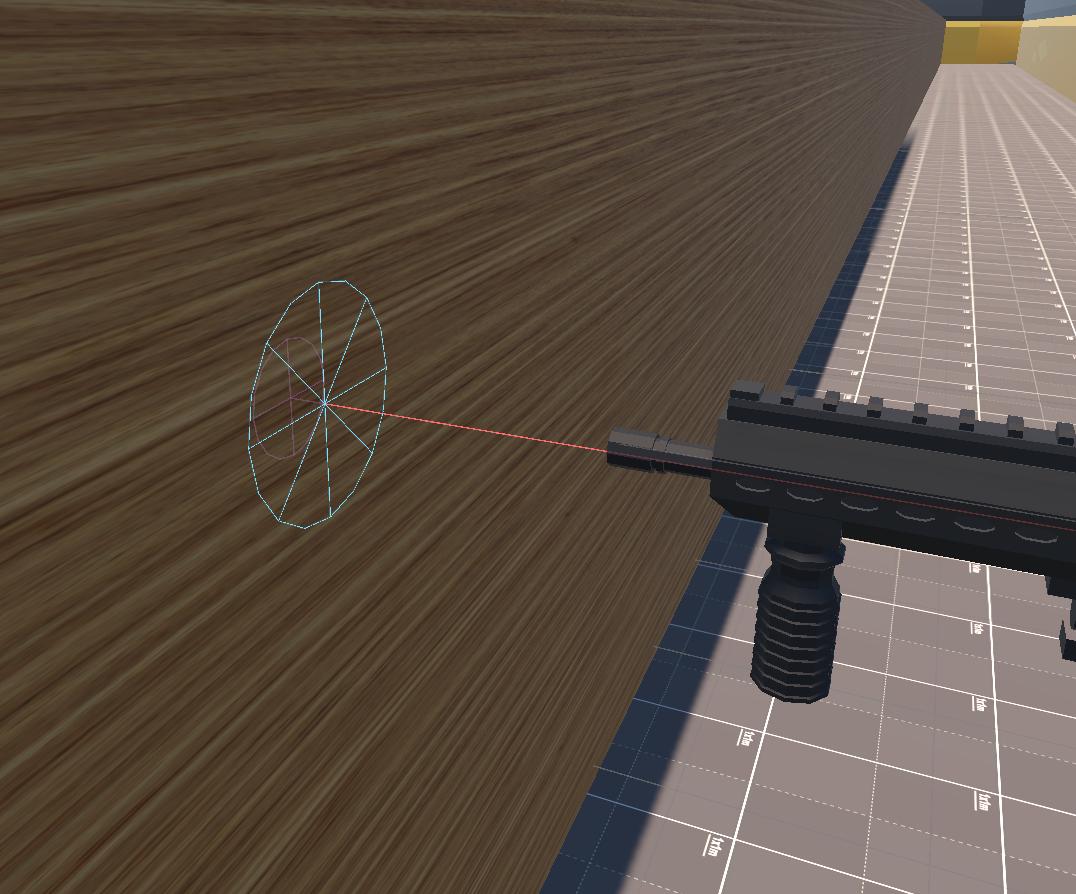
If the projectile gets stuck inside the object, you will see its trajectory (in magenta) and the point where the projectile is (magenta circle with vertical cross).
Some considerations:
- Objects with a width of less than 1mm will be ignored.
- On objects 10 meters or more wide, penetration will always fail.
Tracer System
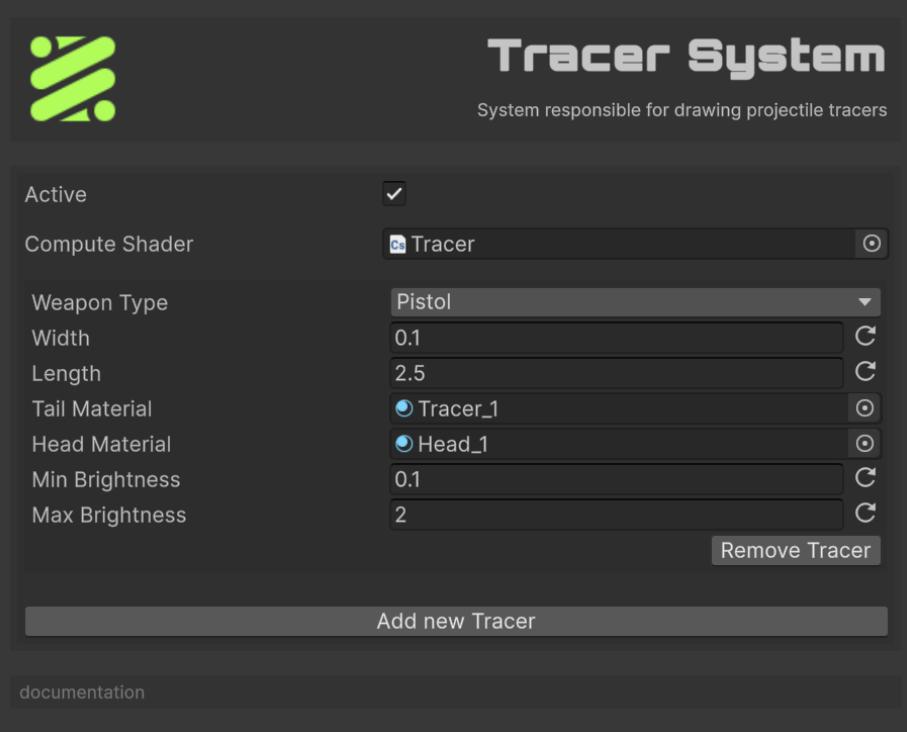
The show-stopper of True Ballistics. For every projectile that carries a TracerComponent it whips up glowing streaks completely on the GPU: a compute shader extrudes two tiny quads (tail + head), scales them to weapon-specific length/width, and modulates brightness by speed so supersonic rounds blaze while slow pellets barely glow. The system keeps per-weapon settings, batches all tracers each frame, and renders them once per camera, so you get cinematic bullet trails that cost virtually nothing on the CPU. Without this system the projectiles would be invisible bolts of math.
✅ Runs entirely on the GPU, so hundreds of tracers cost virtually nothing on the CPU.
✅ Brightness scales with speed, weapon presets let you tweak length/width per gun, and head/tail materials create a convincing muzzle-flash “dot” with a fading tail.
✅ Batches once per camera, so it plays nicely with split-screen or Scene/Game views in the Editor.
❌ No mesh geometry, the compute shader only emits flat quads.
❌ Ricochet bends aren’t visualised, when the Ricochet System changes velocity, the previous tail is discarded and a new straight one begins; you never see the actual kink where the round bounced.
Features:
- Compute shader-based geometry generation.
- Per-weapon-type configuration.
- Brightness based on velocity.
- Separate head/tail materials.
The Compute Shader field must point at “Tracer.compute” that ships with the package (FronkonGames/TrueBallistics/Shaders/Tracer.compute). If you create your own shader (to change color ramps, vertex layout, etc) simply drag that asset into the same slot.
You can add as many Tracers as you want, normally one per weapon type. If a weapon type does not have an associated Tracer, it is ignored.
Configuration:
Weapon Type: Which weapons use this preset.Width: Thickness of the tail quad.Length: World-space length of the streak (metres).Tail Material/Head Material: You must use ‘Fronkon Games/True Ballistics/Tracer’ or similar.Min Brightness: Brightness multiplier at 0 m/s (projectile stopped).Max Brightness: Brightness multiplier at initial speed, the system interpolates between min/max as the round slows down.
A Tracer has this geometry:
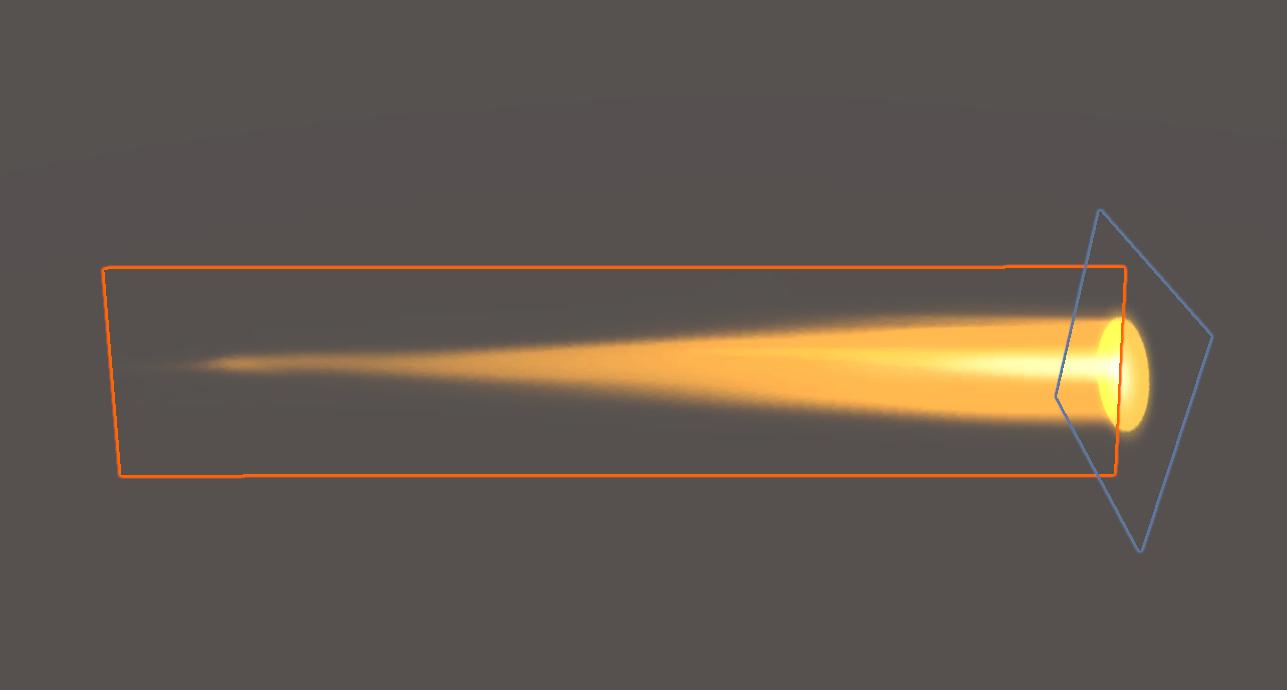
The tail (orange box) is oriented on its longitudinal axis facing the camera. As from the front and from behind you can hardly see anything, the head is a quad that always remains vertical. This way the projectile will be seen from any angle.
Weather System
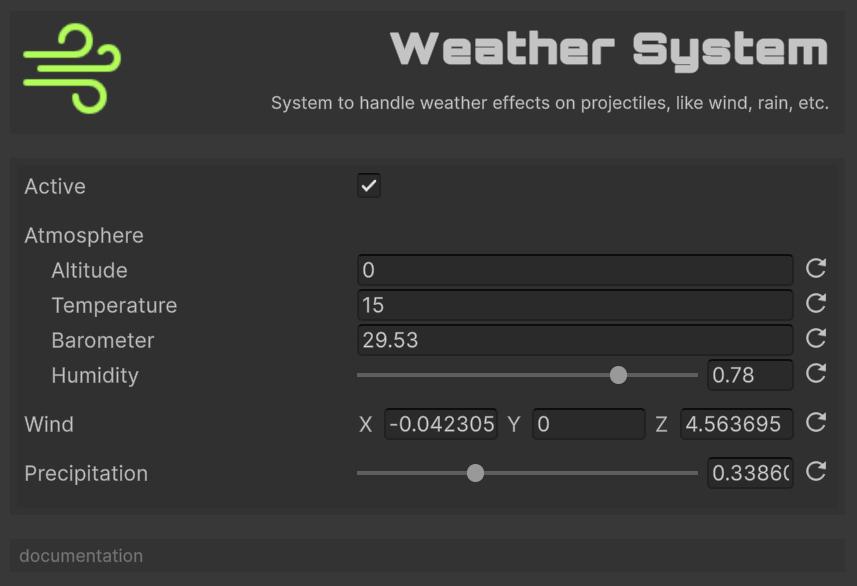
The atmosphere-tuner of True Ballistics. Each frame it computes the full atmospheric profile: temperature, pressure, density, and speed of sound, using the 7-layer ICAO Standard Atmosphere (Troposphere, Tropopause, Stratosphere 1 & 2, Stratopause, Mesosphere 1 & 2, valid from sea level to 84 km).
The temperature and barometerInHg fields are treated as explicit station readings only when they differ from the ICAO sea-level defaults (15 °C, 29.53 inHg); otherwise the values are derived from altitude via the standard lapse rates. Humidity is folded in via the IAPWS-IF97 saturation-vapour-pressure formula with the IAPWS enhancement factor, the ideal-gas mixture law (separate dry-air and water-vapour densities), and the moist-air speed-of-sound correction. The rest of the pipeline then uses the computed density and speed of sound to adjust drag (via WeaponData.Ammo Ballistic Coefficient × AtmosphericCorrection.Correct if used), drop, and drift, making shots feel different on a misty mountain peak than on a hot, windless desert range. Without this system every map would behave like a calm sea-level firing line.
Features:
- Full 7-layer ICAO atmosphere (sea level to 84 km) with proper hydrostatic pressure integration between layer bases.
- Automatic override semantics for
temperatureandbarometerInHg(they’re used as station readings only if they differ from the ICAO defaults). - Humidity-aware air density and speed of sound.
- Wind simulation.
- Precipitation effects (multiplies density by 1 + 0.1·precipitation, simulating a denser wet air).
- The cached air density and speed of sound are read by the advanced spin-drift model (used for the
sqrt(1.225/ρ)normalisation in the Litz formula) and by the transonic drag correction (used for the Mach number).
Configuration:
Altitude: Altitude in meters.Temperature: Temperature in Celsius. If left at 15.0 (the ICAO sea-level default), the temperature is derived fromaltitudevia the ICAO lapse rates (-6.5 K/km troposphere, isothermal tropopause, +1 K/km stratosphere 1, +2.8 K/km stratosphere 2, …). Any other value is used as an explicit station reading.Barometer InHg: Barometric pressure in inches of mercury. If left at 29.53 (the ICAO sea-level default), the pressure is derived fromaltitudevia the hydrostatic equation. Any other value is used as an explicit station reading.Humidity: Relative humidity as a fraction (0..1). Default 0.78 (ICAO standard).Wind: Wind vector in m/s.- Smoke rises vertically: 0-0.5 m/s
- Smoke drifts slightly: 0.5-1.5 m/s
- Leaves rustle: 1.6-3.3 m/s
- Light flags extended: 3.4-5.4 m/s
- Raises dust and loose paper: 5.5-7.9 m/s
- Small trees sway: 8.0-10.7 m/s
- Large branches move: 10.8-13.8 m/s
- Whole trees move: 13.9-17.1 m/s
- Breaks twigs off trees: 17.2-20.7 m/s
- Structural damage possible: 20.8-24.4 m/s
- Considerable damage: 24.5-28.4 m/s
- Widespread damage: 28.5-32.6 m/s
- Extreme damage: 32.7-60.0 m/s
Precipitation: Precipitation intensity (0-1).- Clear conditions: 0.
- Light mist or drizzle: 0.0 - 0.2
- Gentle rain: 0.2 - 0.4
- Steady rainfall: 0.4 - 0.6
- Intense precipitation: 0.6 - 0.8
- Extreme heavy rain: 0.8 - 1.0
Coriolis System
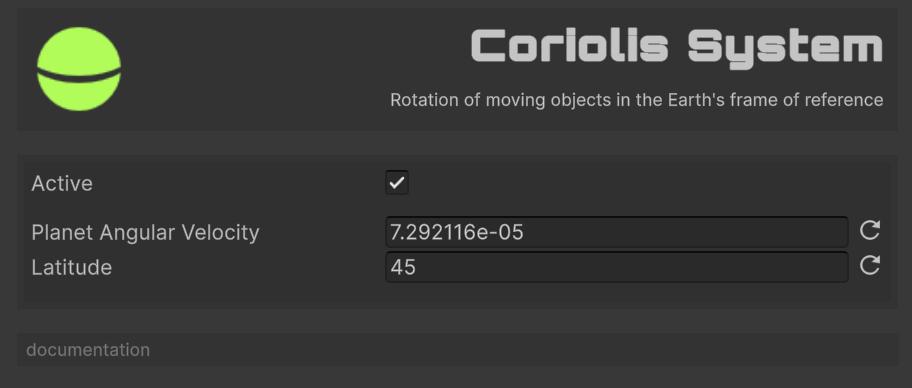
The planet-spinner of True Ballistics. Computes the Coriolis acceleration from the planet’s rotation and current latitude, then adds that deflection to every in-flight projectile, giving long-range shots the subtle sideways (and slight vertical) drift sharpshooters expect. Without this system the world would feel motionless and high-precision sniping would miss that authentic curve.
Features:
- Configurable planetary parameters.
- Latitude-based calculations.
- Realistic deflection patterns.
Configuration:
Planet Angular Velocity: Planet rotation rate.Latitude: Observer latitude.
Spin Drift System
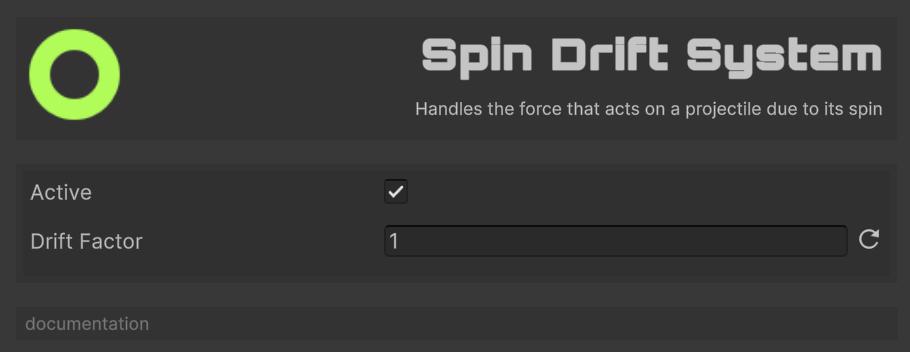
The gyroscopic nudger of True Ballistics. By default it uses the Litz empirical spin-drift model with bullet-type-specific coefficients, McCoy’s aerodynamic jump correction, Courtney-style transonic correction, yaw damping, velocity-decay correction, and air-density normalisation to compute the cumulative lateral drift of each spinning bullet as a function of its flight time, Miller stability factor (SG), and bullet type. The system then applies the per-frame delta as a position offset. The legacy simple Magnus force model remains available as a fallback for when the advanced model is disabled (set WeaponData.Miller Stability Factor to 0 or WeaponData.Use Advanced Spin Drift to false). Without this system rotated projectiles would fly straight, robbing marksmen of that final layer of authenticity.
Features:
- Advanced Litz model (default):
Drift = sign · (k·(SG+1.2)·TOF^1.83 · transonic · yaw · (v/v₀)^0.3 + jump) · sqrt(1.225/ρ)with per-bullet-type coefficients (Match/VLD/Hybrid/FlatBase) for the Litz coefficient (1.15–1.35), McCoy jump factor (0.78–0.95), transonic factor (0.68–0.85), and yaw damping (0.88–0.95). - Legacy Magnus force model (fallback when
Miller Stability Factor≤ 0 orUse Advanced Spin Driftis off): force per frame proportional to spin rate, caliber, barrel length, and current speed, applied to both velocity and position. - Twist rate considerations (twist in inches per turn).
- Barrel length effects (advanced model is independent of barrel length; legacy model includes a
(1 + L/100)empirical factor). - Air-density normalisation (advanced model), bullets drift more in thinner air.
- Transonic correction (advanced model), drift flattens through the transonic region per bullet type.
Configuration:
Drift Factor: Overall drift scaling.
Debug System
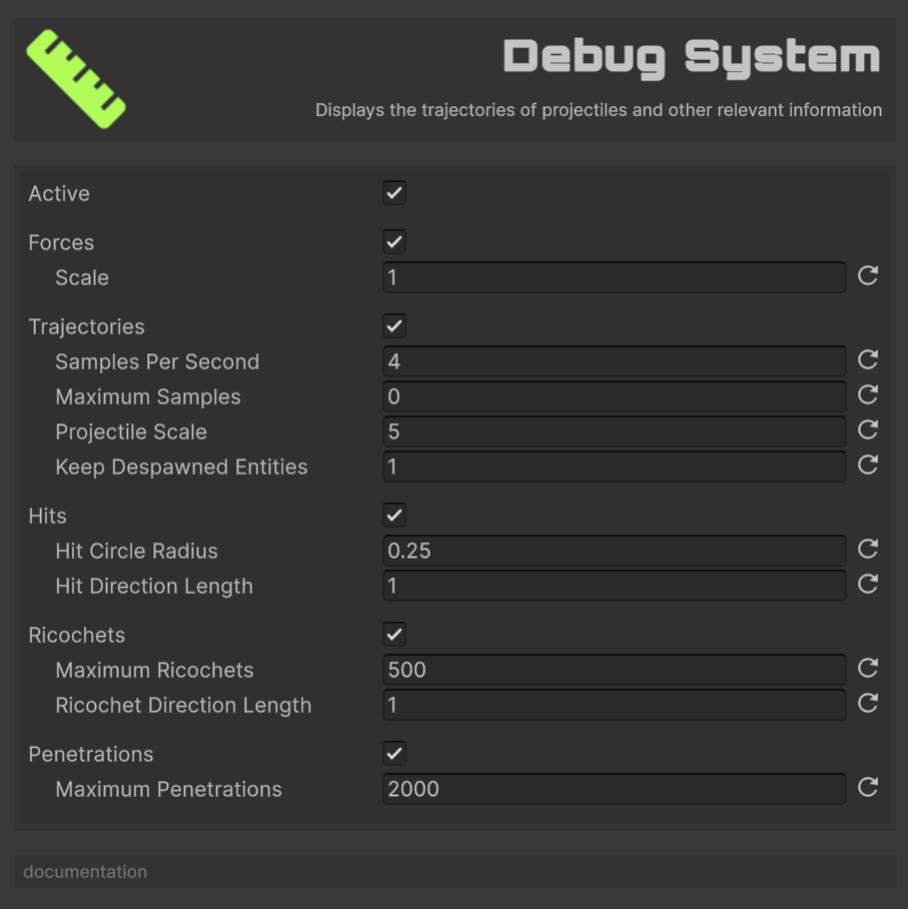
The x-ray goggles of True Ballistics. In the Unity Editor it samples every active projectile, stores positions, forces, impacts and ricochet/penetration data, then draws colour-coded gizmos: flight paths fade from red to gray with speed loss, force vectors sprout from the tracer, and icons mark hits, bounces and stuck rounds. Despawned trajectories linger for a set time so you can pause, inspect and fine-tune your settings. Disabled in builds, it’s pure dev tooling, turn it on when you need answers, off when you ship.
Features:
- Trajectory visualization with speed coloring
- Force vector display
- Impact point markers
- Ricochet and penetration visualization
- Configurable retention time
Forces
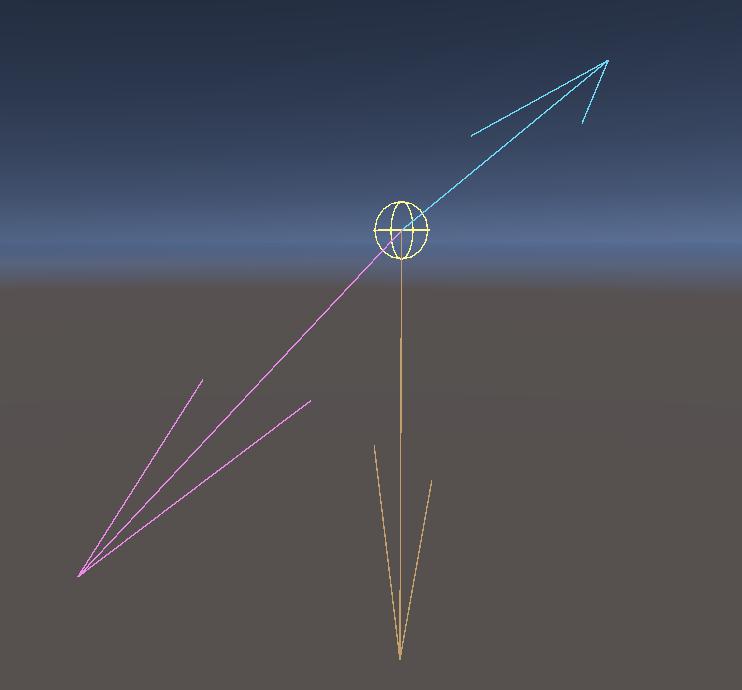
It shows the position of the projectile (yellow sphere), its momentum (cyan arrow), gravity (orange arrow) and the sum of the other forces acting on the projectile (magenta arrow).
Trayectories
Shows the trajectory of the projectile, colored according to the percentage of the initial velocity:
| Color | Initial Velocity |
|---|---|
| Red | >=75% |
| Orange | >=50% |
| Yellow | >=25% |
| Green | >=10% |
| Gray | <10% |
Configuration:
Samples Per Second: How many trajectory points the system records for each active projectile every second. Higher values = smoother lines but more memory/Gizmos; lower values = coarse, lighter.Maximum Samples: Hard cap on points stored per projectile. 0 means unlimited; any positive number stops recording once that count is reached (older points are then dropped).Projectile Scale: Uniform size multiplier for the sphere/mesh that represents each live round in the Scene view. Useful when your game world is tiny (scale < 1) or huge (> 1).Keep Despawned Entities: Time in seconds to keep drawing a projectile’s last trajectory after it has been despawned. 0 = remove immediately; > 0 lets you pause/inspect past shots for that duration before they are purged.
Hits
Shows the points at which the projectile collides with an object.
Configuration:
Hit Circle Radius: Increase it if impacts are hard to spot, decrease it if the circles cover too much of the scene.Hit Direction Length: Next to each impact disc the system also draws a line‐arrow that shows the incoming shot direction.
Ricochets
It shows the points at which the projectile bounces off a material.
Configuration:
Maximum Ricochets: Limits how many ricochet events the Debug System keeps and draws at once. 0 = no limit (every bounce is stored and shown), positive value = only the most-recent N ricochets are retained; older ones are discarded.Ricochet Direction Length: The length, in world metres, of the two arrows the system draws at each ricochet point: one for the incoming velocity, one for the outgoing velocity.
Penetrations
It shows the points and trajectories of the projectile penetrating objects.
Configuration:
Maximum Penetrations: Sets how many penetration events the Debug System retains and visualises at once. 0 = unlimited (every entry/exit/stuck point is kept). Any positive number keeps only the most-recent N events, discarding older ones.
Customs Systems
Creating a custom system involves inheriting from SystemBase and implementing the required methods:
[CreateAssetMenu(fileName = "CustomSystem", menuName = "My Game/Custom System")]
public class CustomSystem : SystemBase
{
  // Execution order (lower = earlier)
  public override int ExecutionOrder => 1500;

  // System initialization
  public override void Initialize(BallisticsManager manager)
  {
      base.Initialize(manager);
      // Setup system resources
  }

  // Called before physics update
  public override void PreTick(float deltaTime)
  {
      if (!active) return;
      // Pre-physics logic
  }

  // Main system update
  public override void Tick(float deltaTime)
  {
      if (!active) return;
      // Main system logic
  }

  // Called after physics update
  public override void PostTick(float deltaTime)
  {
      if (!active) return;
      // Post-physics logic
  }

  // System cleanup
  public override void DeInitialize()
  {
      // Cleanup resources
      base.DeInitialize();
  }
}
Example: Simple Gravity Well System
[CreateAssetMenu(fileName = "GravityWellSystem", menuName = "My Game/Gravity Well System")]
public class GravityWellSystem : SystemBase
{
  [Header("Gravity Well Settings")]

  // Scene object that defines the attractor position.
  public Transform gravityWellCenter;

  // Pull strength (think “G” constant). Bigger = stronger attraction.
  public float gravityWellStrength = 10.0f;

  // Effective range in metres. Outside this radius nothing happens.
  public float gravityWellRadius = 50.0f;

  // Run shortly after PhysicsSystem.
  public override int ExecutionOrder => SystemExecution.Physics + 50;

  // Called once per frame after other systems have updated positions.
  public override void PostTick(float deltaTime)
  {
    // Skip early if disabled or no centre assigned.
    if (!active || gravityWellCenter == null)
      return;

    // Grab the PhysicsComponent array for fast indexed access.
    var physicsComponents = manager.GetComponentArray<PhysicsComponent>();

    // Iterate over every possible entity slot.
    for (int i = 0; i < BallisticsManager.MaxEntities; i++)
    {
      // Ignore unused slots.
      if (!manager.entities[i])
        continue;

      // Reference (not copy) for in-place modification.
      ref var physics = ref physicsComponents[i];

      // Vector from projectile to well.
      Vector3 toWell   = gravityWellCenter.position - physics.position;
      float   distance = toWell.magnitude;

      // Only act inside the radius and avoid divide-by-zero when very close.
      if (distance < gravityWellRadius && distance > 0.1f)
      {
        // Inverse-square fall-off: F = G / r².
        float   force        = gravityWellStrength / (distance * distance);
        Vector3 gravityForce = toWell.normalized * force * physics.mass;

        // Integrate acceleration into velocity ( v += a Δt ).
        physics.velocity += gravityForce * deltaTime / physics.mass;
      }
    }
  }
}
Utilities
True Ballistics ships a set of small, dependency-free static utility classes under Runtime/Utils/. They’re useful both at runtime (HUDs, debug visualisers, ballistic calculators) and as building blocks for custom systems.
| Utility | What it does |
|---|---|
AtmosphericCorrection.Correct(bc, altitude, barometerInHg, temperatureC, humidity) |
Folds altitude, pressure, temperature, and humidity into a corrected BC using the IAPWS-IF97 model. Call this once when configuring a bullet to get the right BC for the current atmospheric conditions; PhysicsSystem will then apply the G-table drag on top. |
WindUtility.Decompose(worldWind, fireDirection, out headwind, out crosswind) |
Resolves a world-frame wind vector into the headwind and crosswind components experienced by a bullet fired in the given direction. |
WindUtility.ToWorldWind(speed, angle, fireDirection) |
Inverse: takes a (wind speed, wind angle) pair and a fire direction, returns a world-frame wind vector suitable for WeatherSystem.wind. Angle convention: 0° headwind, 90° right-to-left crosswind, 180° tailwind, 270° left-to-right. |
ZeroAngleUtility.Compute(dragModel, bc, mv, sightHeight, zeroRange, yIntercept, ...) |
Successive-approximation solver for the bore-elevation angle that places the bullet at the given intercept height at the given zero range. |
PBRUtility.Compute(dragModel, bc, mv, sightHeight, vitalSize, ...) |
Point-blank range solver: finds the bore-elevation angle placing the trajectory vertex at half the vital-zone size, then reports the min/max engagement range and the scope-in height at 100 m. |
AdvancedSpinDriftUtility.Compute(sg, timeOfFlight, velocity, mv, spinRate, ...) |
Cumulative lateral spin drift (Litz empirical model with bullet-type-specific coefficients, McCoy jump, transonic correction, yaw damping, velocity decay, density normalisation). Returned in metres. |
MillerStabilityUtility.Calculate(massGrains, mvFps, caliberInches, lengthCalibers, twistInchesPerTurn, designConstant) |
Computes the Miller SG (stability factor) for a bullet from its physical specs. Returns ≥ 1.0 for stable, < 1.0 for unstable. CalculateSI is the SI-input overload. |
IcaoAtmosphere.Calculate(altitudeM, humidityFraction, tempOverrideC, pressOverrideHpa) |
Full 7-layer ICAO atmosphere: temperature K, pressure Pa, density kg/m³, speed of sound m/s. |
ProjectileShapeUtility.Resolve(bulletName, caliberInches, massGrains, dragModel) |
Resolves a ProjectileShape from an optional bullet name (substring match) and the drag model / calibre / mass heuristic. |
ShotgunPatternUtility.ResolvePelletConeRadius(shell, spreadMul) / ToFactor(choke) / SampleUniformDisk / SampleGaussianDisk |
Shotgun pattern helpers: named choke factors, size-aware cone radius, uniform / Gaussian disk sampling. |
DragModels.TryGetTable(model, source, out keys, out values) |
Resolves Cd-vs-Mach arrays for a drag model and table source (Approximate or McCoy). |
All utilities are public static class with public static methods; no instantiation required. They are pure functions, no side effects, no state.
Simple FPS
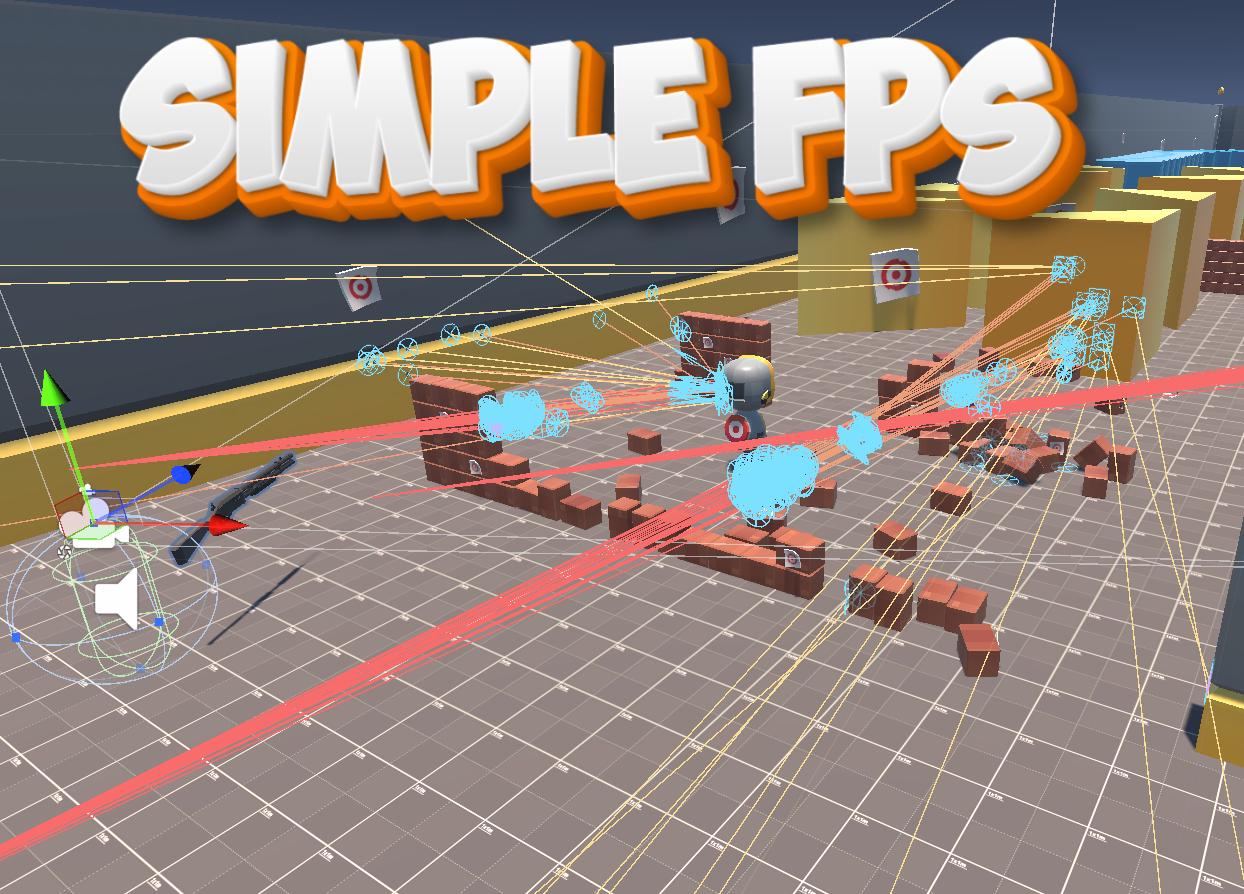
Simple FPS is a self-contained first-person-shooter sandbox that ships with True Ballistics to show, rather than just tell, how the library plugs into a game loop.
At its core it is an event-driven micro-framework: every time the player moves, fires, changes weapons or collides with the world, a strongly-typed event is raised and routed through a lightweight dependency container that “auto-wires” the correct listeners.
Because each piece of behaviour lives in its own MonoBehaviour (input, movement, camera, weapon, inventory, audio, player physics), you can open any script and see a single, well-scoped responsibility with clear comments.
Although the package is fully functional, it deliberately avoids sophisticated gameplay systems; its goal is to be a clean, minimal reference you can dissect, copy into prototypes or use to validate weapon settings before integrating True Ballistics into your own project.
No official support is offered beyond this educational purpose.
Support
Do you have any problem or any suggestions? Send me an email to fronkongames@gmail.com and I’ll be happy to help you.
Remember that if you want to inform me of an error, it would help me if you sent to me the log file.
If you are happy with this asset, consider write a review in the store
❤️ thanks! ❤️
If you are happy with this asset, consider write a review in the store
❤️ thanks! ❤️